NZTRM: energy risk management software for energy advisers
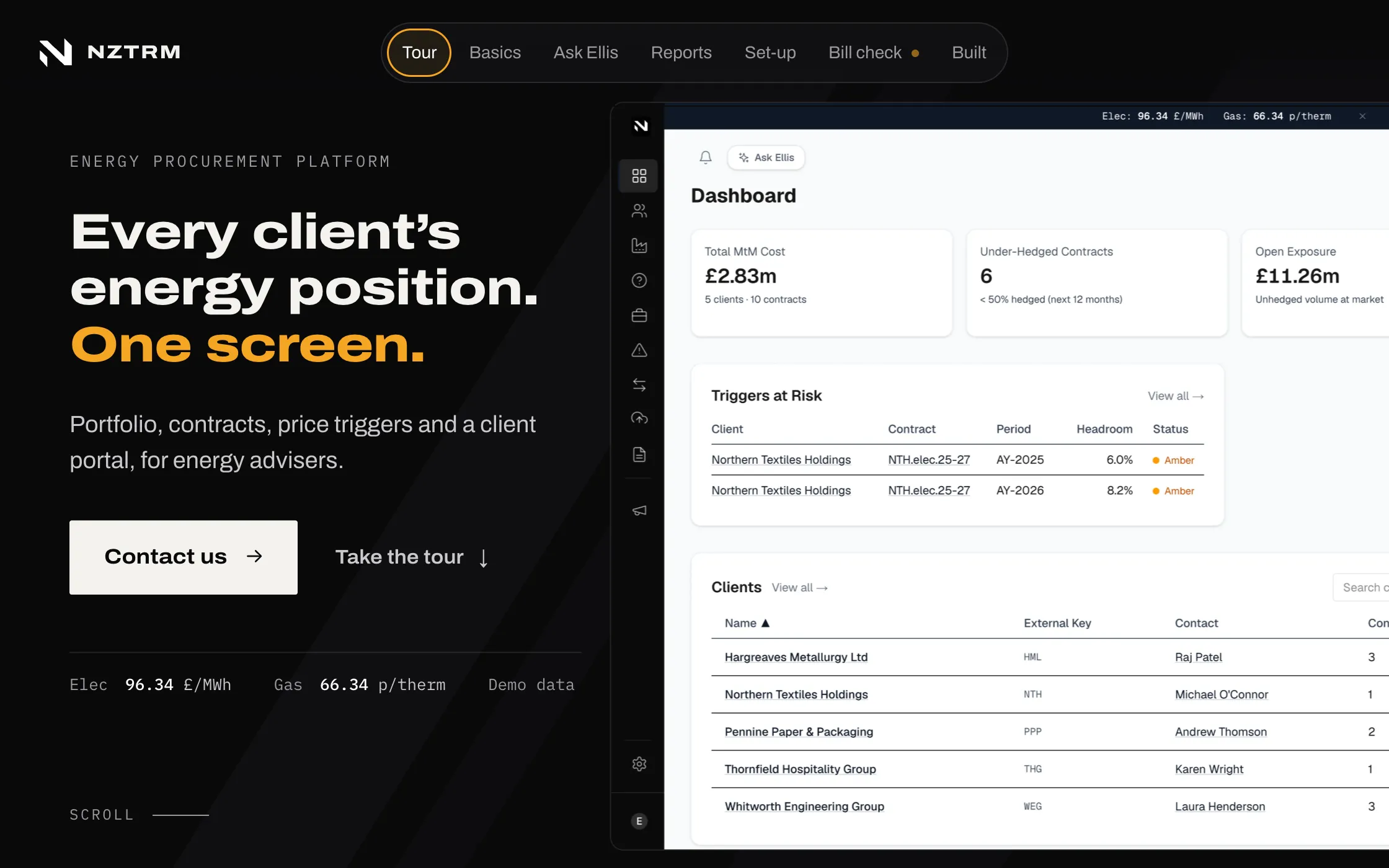
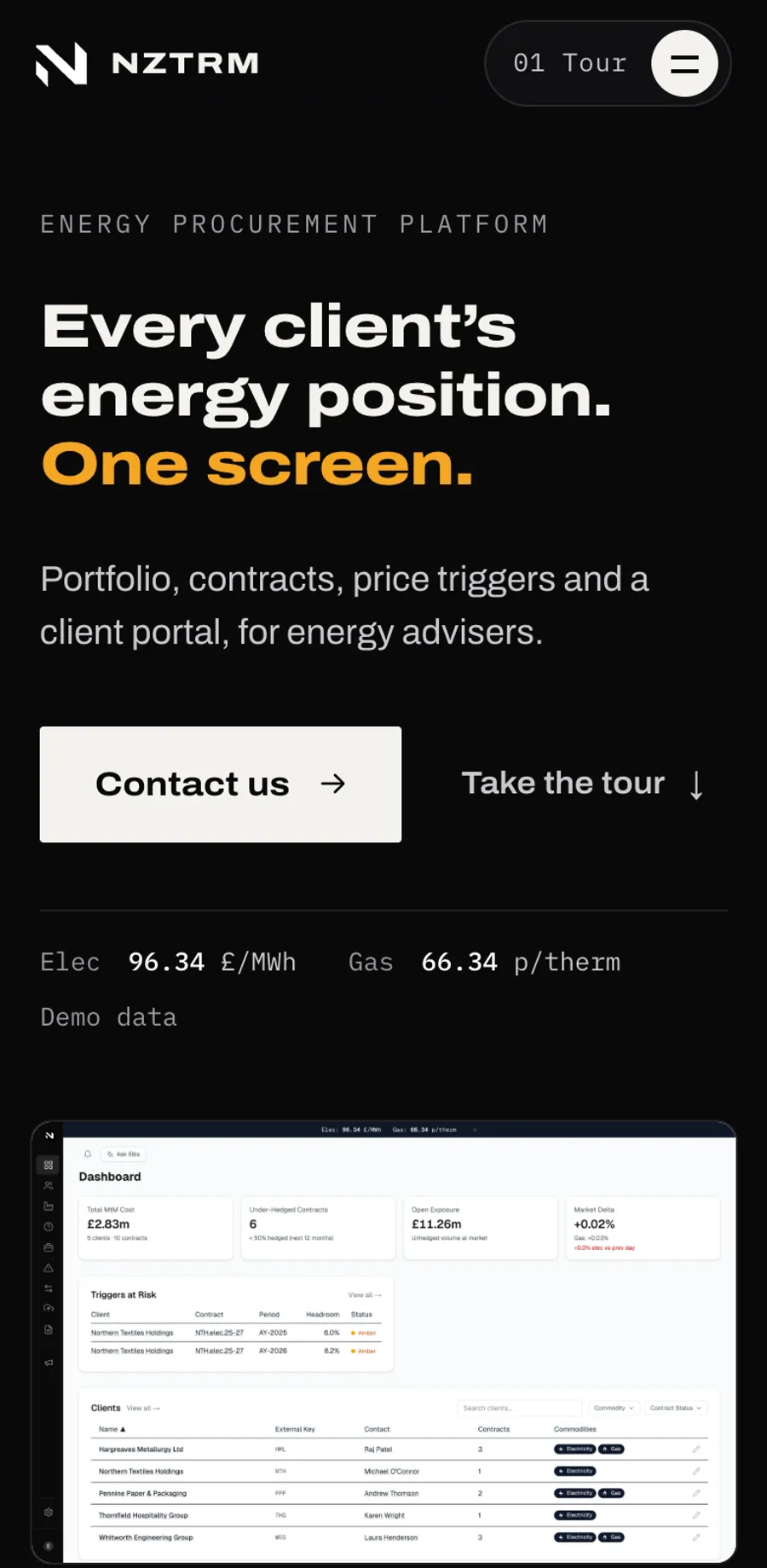
NZTRM is energy risk management software for advisers and brokers. It holds every client's contracts, what is hedged and what is still open, price triggers, reports and a portal for each client. It replaces the trade spreadsheet.
Open exposureEnergy you will use but have not priced yet
Triggers at riskPrices nearing the level you chose to buy at
Real screens from the demonstration, running on made-up data. Every figure and every client name on them is fictional. The app demo is staff only. See the seven screens
At a glance
Who it is for
Energy advisers, and the businesses whose gas and power they buy.
What it does
Shows every client's contracts, how much is priced and what is still open, and gives each client their own portal.
What we did
Rebuilt it on one platform with no database or sign-in vendor in the middle, then built the public website and the demonstration around it.
Access today
The website at nztrm.uk is public. The app demonstration is staff only, so it is not linked from here.
Why do energy advisers outgrow the spreadsheet?
An energy adviser buys gas and power for many businesses, months or years ahead. Where the deals live in a spreadsheet, everything else is built on top of it by hand.
01
One file knows everything
The spreadsheet of trades is the only complete record, so the answer to what is still open lives with whoever last opened it.
02
The weekly report is copy and paste
Each client expects a market report. Assembled by hand from prices and news, it is the same repeated work every week.
03
Clients are sent files, not answers
A client who wants to know where they stand has to email, wait, and read an attachment.
What does energy risk software show an adviser? Seven real screens
Each screen is a capture of the running demonstration. Under each one is the same thing said without the jargon.
01Dashboard
Start the day with what is open
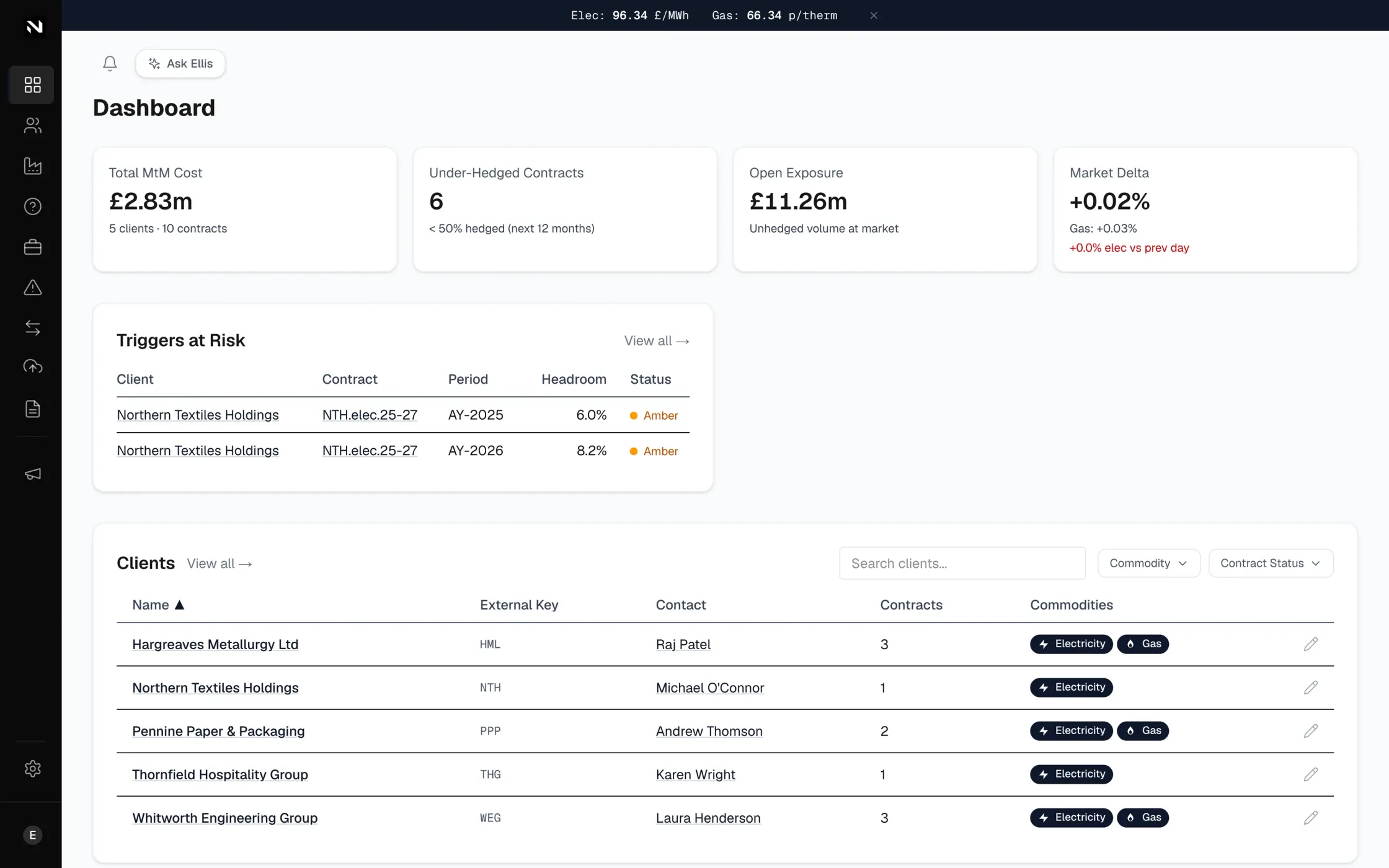
The dashboard leads with open exposure: the energy clients will use that nobody has priced yet. Under it, the price triggers that are close to firing and the full list of clients.
In plain EnglishEnergy you will definitely use but have not fixed a price for yet. Start with the contracts that are least covered.
Dashboard
02Portfolio
See where hedging cover runs out
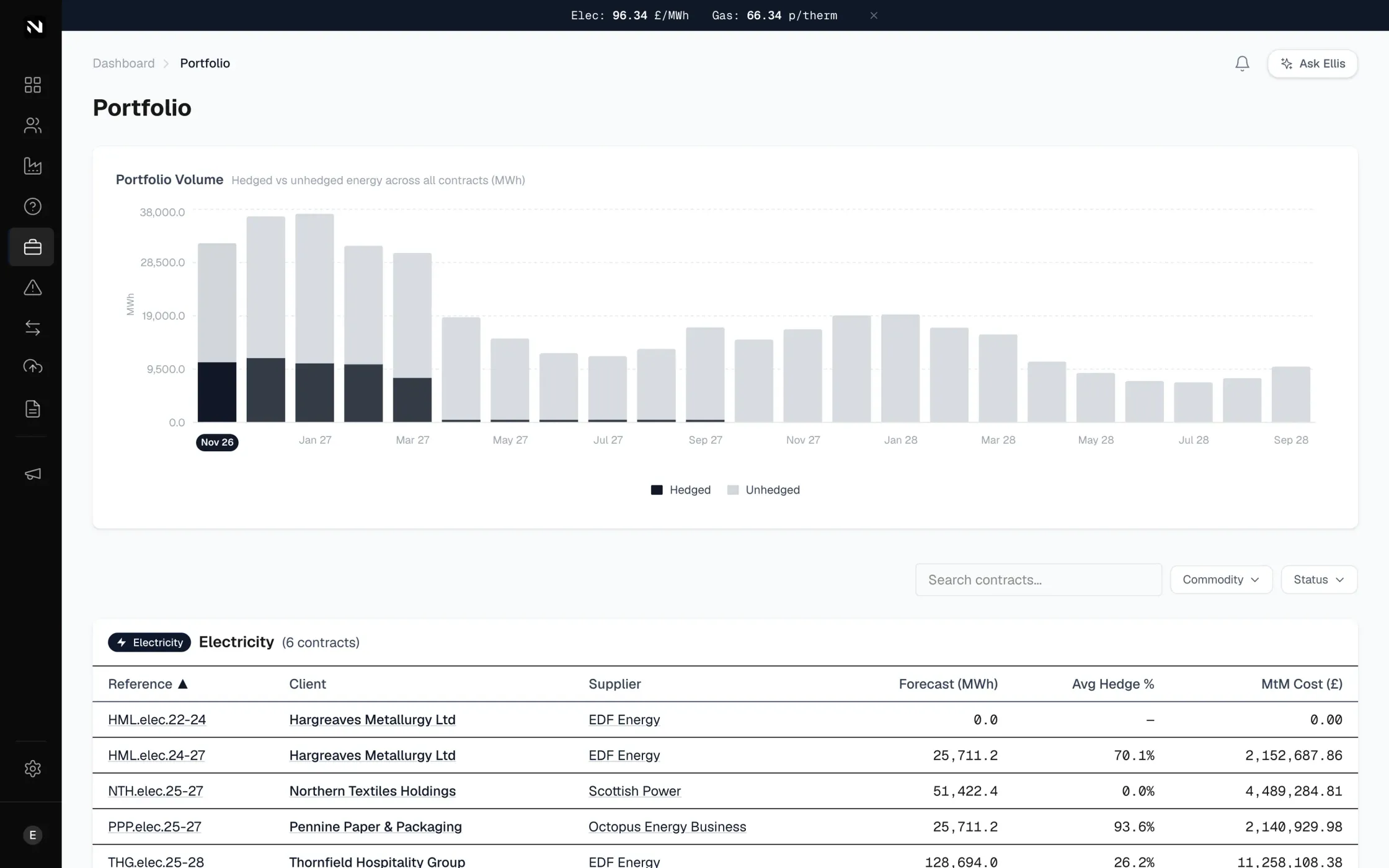
The portfolio page shows every contract month by month. Dark bars are hedged, grey bars are still open to the market, so the thin months stand out at once.
In plain EnglishHedged means the price is already fixed. The grey part is the part that still moves with the market.
Portfolio
03Contracts
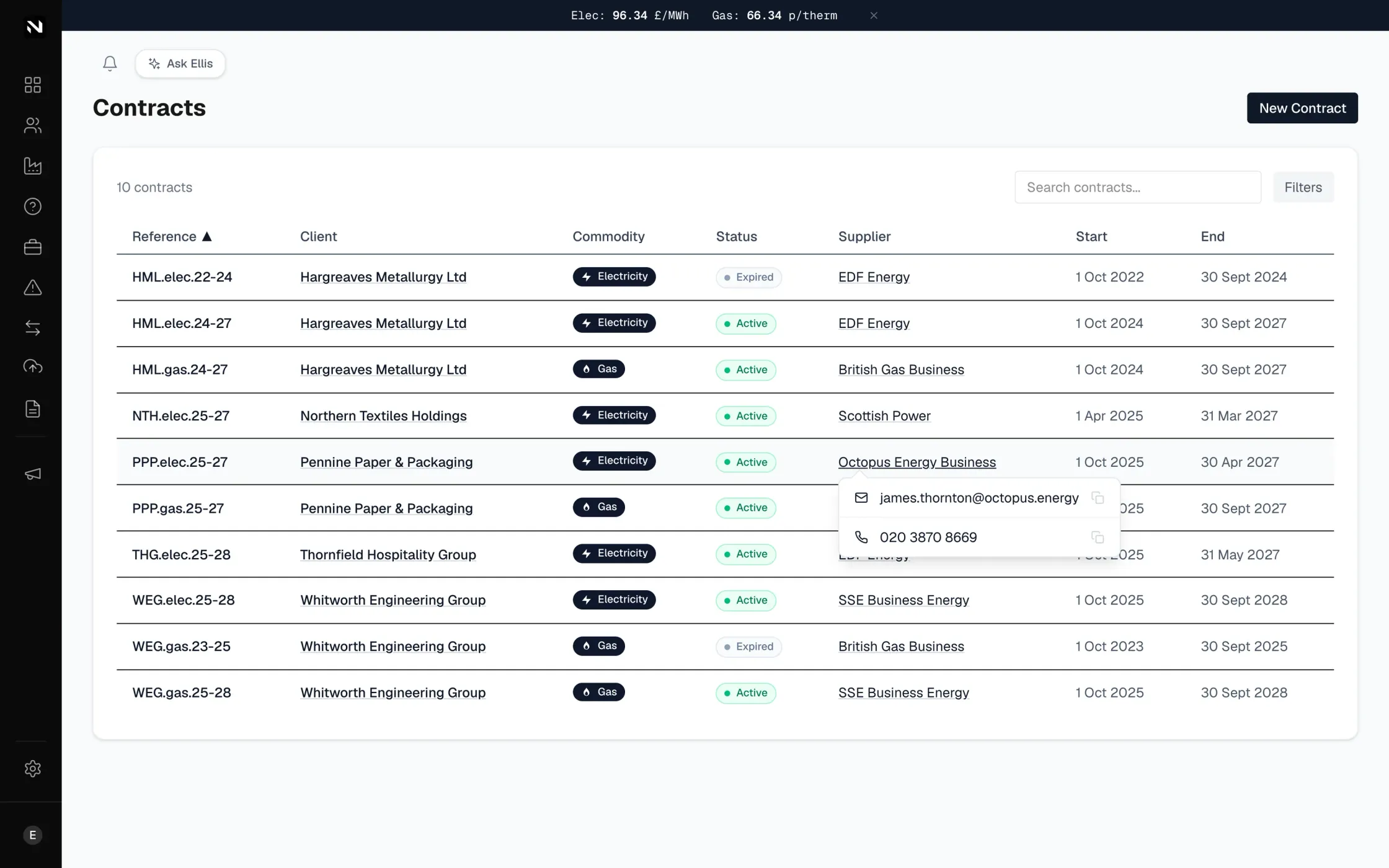
Every contract, and who to ring
One table of client, supplier, status and dates. Hover a supplier and their contact details appear, with copy buttons.
In plain EnglishThe deal with each supplier: when it ends and who to call about it.
Contracts
04Client portal
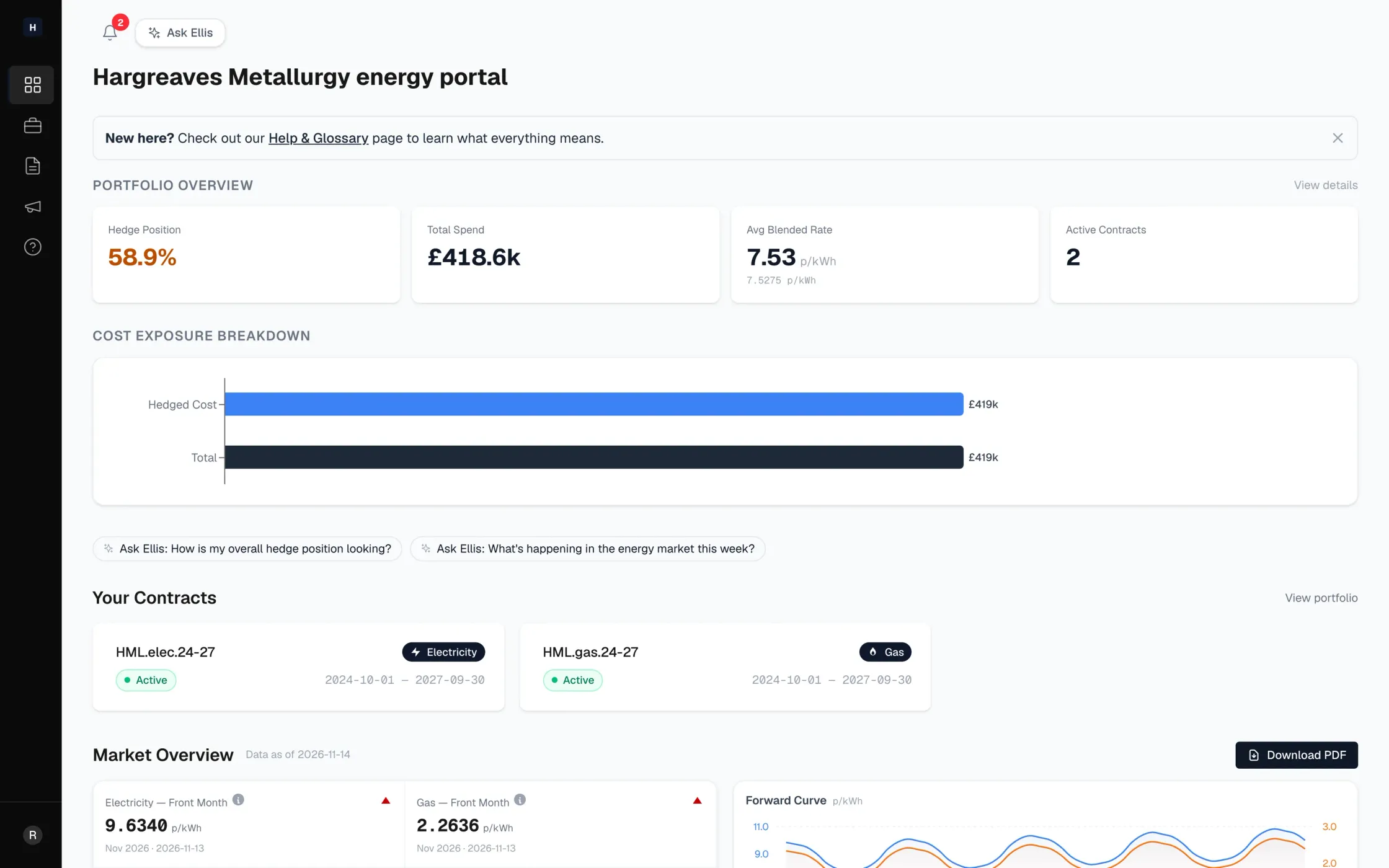
A client portal for each energy client
Each client signs in to see their own hedge position, spend and contracts, plus the reports their adviser publishes. The adviser shares a position, not a spreadsheet.
In plain EnglishYour client sees their own position, with nothing to email and nothing to chase.
Client portal
05Ellis conversations
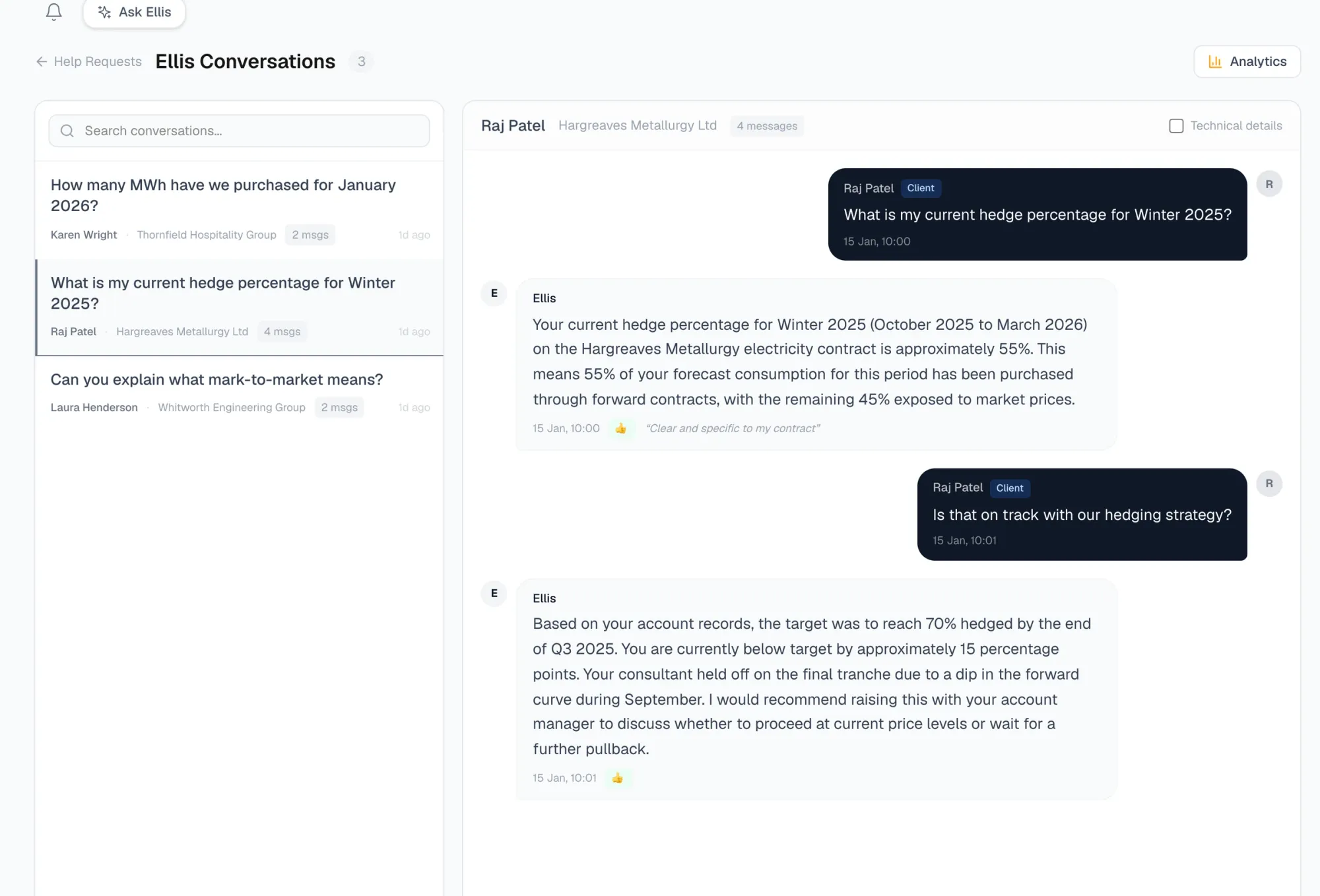
An assistant that answers from the client's own contracts
Ellis is the assistant inside the portal. A client asks about their report or their position, and it answers from their own contracts and reports. The adviser sees both sides of every conversation, with a to-do list for what Ellis hands back.
In plain EnglishA well-briefed colleague who answers from your own contracts and reports, and does not give financial advice.
On the public demonstration the assistant is scripted and labelled illustrative, because the demonstration has no live AI. The screen shown is the adviser's real conversations page, with sample conversations.
Ellis conversations
06Schedule a report
Reports drafted, scheduled and delivered
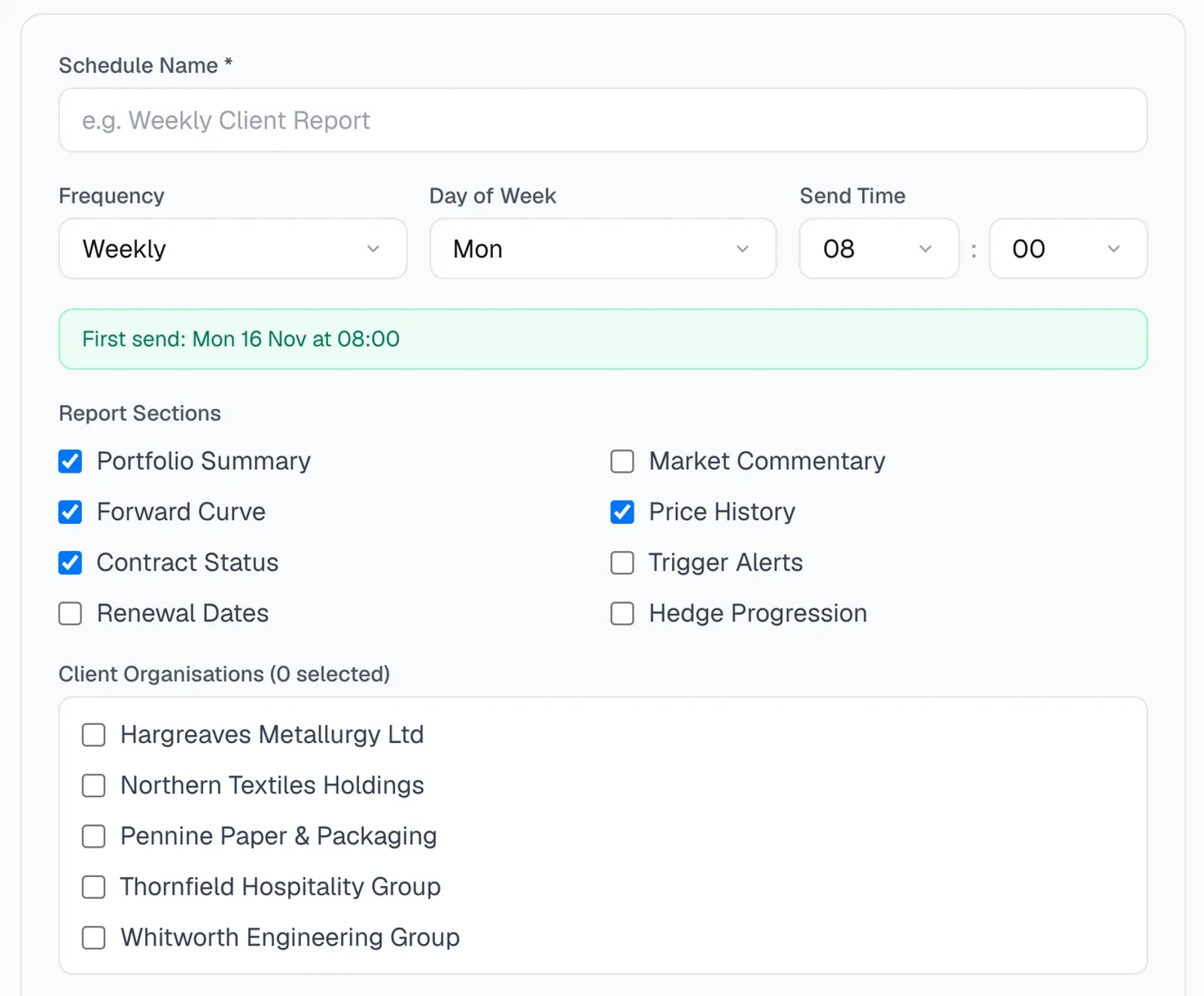
One button drafts the market report from the day's prices and the last three days of energy news. A person reads it, fixes it and publishes. Then it is scheduled once: pick the day, the sections and the clients. Published reports appear in each client's portal as a PDF.
In plain EnglishAI writes the first draft. A person decides what goes out.
The draft step is an illustrative, scripted replay on the demonstration. The schedule screen shown is real.
Schedule a report
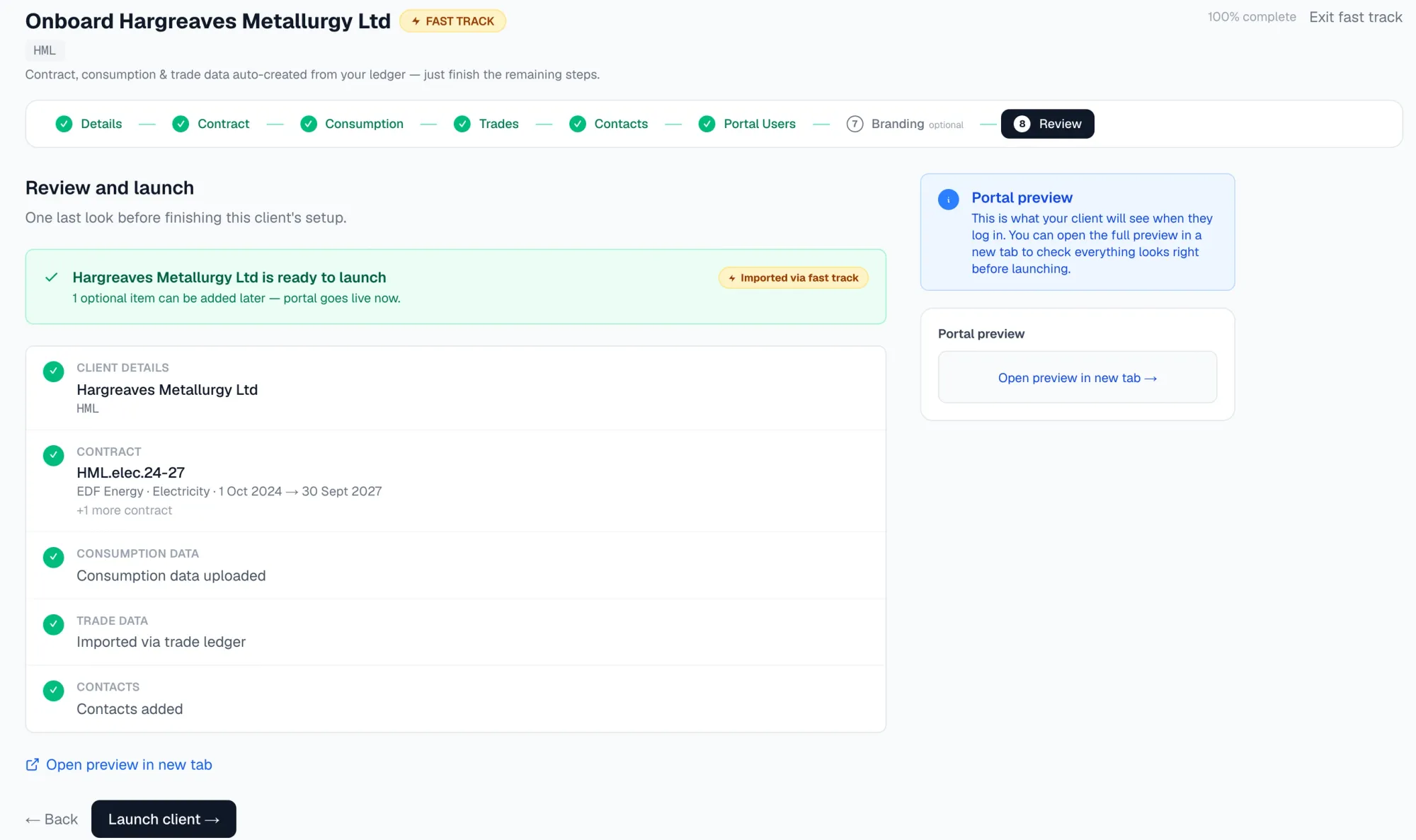
07Fast track set-up
A new client, set up from your trade spreadsheet
Drop in the trade ledger you already keep. NZTRM finds every client in it, then creates the client details, contracts, consumption and trades from that one file. Four of the eight set-up steps are done before anyone types. A person adds the contacts, checks the review page and presses launch.
In plain EnglishHalf the form is filled in for you, and the next client is already waiting in the same file.
Fast track set-up
How is each firm's client data kept separate?
Here is one request followed from the door to the data. The part of NZTRM we spent longest on is the part you never see: what happens between someone opening a page and their numbers appearing. Scroll to follow it.
01 of 05
A request arrives
An adviser, or one of their clients, opens a page. At this point nothing is trusted: the app does not yet know who is asking.
In plain EnglishLike someone arriving at reception with no badge.
02 of 05
Sign-in, with no passwords
Staff sign in with Google. Client users get a one-time code by email. Sign-in is by invitation only: an address can get in only if someone has already added it. There are no passwords to forget, reuse or leak.
In plain EnglishA code that works once, sent to an inbox you already control.
03 of 05
The app works out whose data this is
Once the sign-in is checked, the request is tied to one firm. That firm comes from the verified session, never from anything the visitor typed or sent.
In plain EnglishThe badge says which firm you belong to, and the badge cannot be edited by the person holding it.
04 of 05
It is handed one database, and only that one
Each firm's data lives in its own small database, separate from every other firm's. The request is pointed at its firm's database and cannot name another. Isolation depends on which database a request is handed, not on a filter someone has to remember to write.
In plain EnglishA separate locked filing cabinet for each firm, rather than one big cabinet with sticky notes.
05 of 05
The data stays in the EU
The databases are created in the EU jurisdiction of the hosting platform, so the data is kept in the EU. The shared register of firms and sign-ins sits in an EU database too.
In plain EnglishKept in the EU, and pinned there when the database is created.
How was NZTRM designed?
Six decisions shaped it, each with real alternatives. This is the record of the options we weighed and rejected, and why, from the project's own decision log.
01 Decision
How do we keep each firm's data apart?
The existing application kept firms apart with a database feature called row-level security. The new platform's database does not have it, so something had to replace it.
RejectedOne shared database with a firm filter on every query
The separation would be logical only: one forgotten filter and a firm sees another firm's rows. Many queries relied on the old database feature rather than a filter, so every route would have needed auditing.
RejectedKeep the old database somewhere else
Ruled out by our own rule that every new service and database goes on Cloudflare, in the EU. We also decided to drop the outside database vendor.
ChosenOne private database per firm
Separation is physical. A request holds a handle to its own firm's database and cannot name another's. The query code could stay as it was, with one place to change, and the isolation can be tested directly.
02 Decision
Who guards the door to the demonstration?
The demonstration holds made-up data, but it should still be private until it is opened on purpose.
ReplacedA separate access gate in front of the app
It worked, and we ran it first. It also put a second product, with its own rules, in front of the sign-in the app already has.
ChosenThe app's own Google sign-in
On 14 November 2026 the gate was retired. Only Google accounts on the staff domains get in, with a verified mailbox, and the list is checked again on every request. The door is now the same sign-in code the product uses, so there is one thing to test.
03 Decision
Do we keep passwords?
Every system that stores passwords has to protect them, and a lost or reused one is a common way into an account.
DroppedPasswords with enterprise single sign-on
The original product had both. We recorded dropping them as a capability change, and removed the settings screens that went with them, rather than hide the loss.
ChosenEmail code, plus Google for staff
Invite-only, no password to store, reset or leak, and sessions that are ours to revoke.
04 Decision
Should the public demonstration run a live AI?
A live assistant on a demonstration page costs money per question and can say things nobody has checked.
RejectedLive assistant on the demonstration
The demonstration has no live AI and no background jobs. It spends nothing on email or AI, and it cannot answer a visitor with something unreviewed.
ChosenScripted replays, labelled as such
The chat, the report draft and the client set-up are replays built from the demonstration's own data, each marked illustrative on the page. The screens around them are real.
05 Decision
How do we show the product: recordings or real screens?
The first version of the tour was thrown away completely.
Thrown awayScreen recordings and tilted 3D frames
Recordings came out compressed, with a cursor dot and loading flashes. Tilted frames made small figures harder to read. The product's value is that its screens are calm and legible, and the first version hid that.
ChosenFlat, real screens at full size
Real captures with a camera that moves to the part that matters, a plain-English line under each, and no video anywhere. A check in the build fails if a video or a 3D transform appears.
06 Decision
How many outside services does a report need?
Every extra vendor is one more thing that can fail, change its price or need its own security review.
RejectedA file store for PDFs and a separate email vendor
More to run, and stored files that can go stale.
ChosenRender the PDF when it is asked for, send through the platform's own email service
Reports are drawn on demand from the stored figures, so nothing is stored that could be out of date. Email goes through the platform's own service, so the app holds no outbound mail credential.
Energy risk software: common questions
What is energy risk management software?
It is software that shows how exposed a business is to energy prices. It shows which contracts are in place. It shows how much of the expected energy use is already at a fixed price, and what is still open to the market. NZTRM is built for energy advisers and brokers who watch that position for many clients.
What is open exposure in energy hedging?
Open exposure is the energy a client will use but has not yet fixed a price for. Hedged energy is already priced. NZTRM puts open exposure at the top of the dashboard so the least covered contracts are seen first.
Can an energy adviser give each client their own portal?
Yes. In NZTRM each client signs in to see their own hedge position, spend and contracts, plus the reports their adviser publishes. Each firm's data is kept in its own private database.
Can NZTRM replace the spreadsheet of trades?
That is what it is built for. You drop in the trade ledger you already keep. NZTRM creates the client details, contracts, consumption and trades from it, so four of the eight set-up steps are done before anyone types.
How do clients and staff sign in?
Staff sign in with Google and client users get a one-time code by email. Sign-in is by invitation only and there are no passwords to store, reset or leak. No Microsoft account is needed.
Can I try NZTRM?
The demonstration runs on made-up data and is limited to staff today. To ask about NZTRM, or about software built around your own spreadsheet, send us a request for a quote.
What NZTRM depends on
NZTRM runs on one hosting platform, Cloudflare. Staff sign in with Google, clients with a code sent to their email, and no Microsoft account is needed to use it.
Further reading on zxn.uk
The reasoning behind the platform and sign-in choices is written up in public.
NZTRM is a demonstration of a working product. These are the honest edges of it.
Bill validation: planned, not built
The idea is to check each supplier bill against its contract, line by line. Bills that do not add up are held before anyone pays them. The sample on the landing page is a concept, with illustrative figures.
Before it holds real data
The demonstration has one environment because it holds made-up data only. A live version would get separate staging and production environments, and the import step is made all-or-nothing before any real file is uploaded.
Opening the demonstration
It is limited to staff today. Whether and when it opens to everyone is a decision for the owner of NZTRM, not for us.
Need software built around your spreadsheet?
Tell us what your team does on a spreadsheet today and who needs to see what. We reply the same day, 7 days a week, with a fixed price in writing.
Facts checked on 15 November 2026 against the project's own decision records. Every figure and client name on the screens is fictional demonstration data.
Help us improve this site. We count visits, and Accept also lets us record how pages are used and see which Google ads led to an enquiry. Details