zxn Chat is website chat that we designed, built and run ourselves. A chat window on your site answers from your own information, and a person steps in when it matters. The team replies from a web inbox or a phone. It has run on zxn.uk since 10 November 2026.
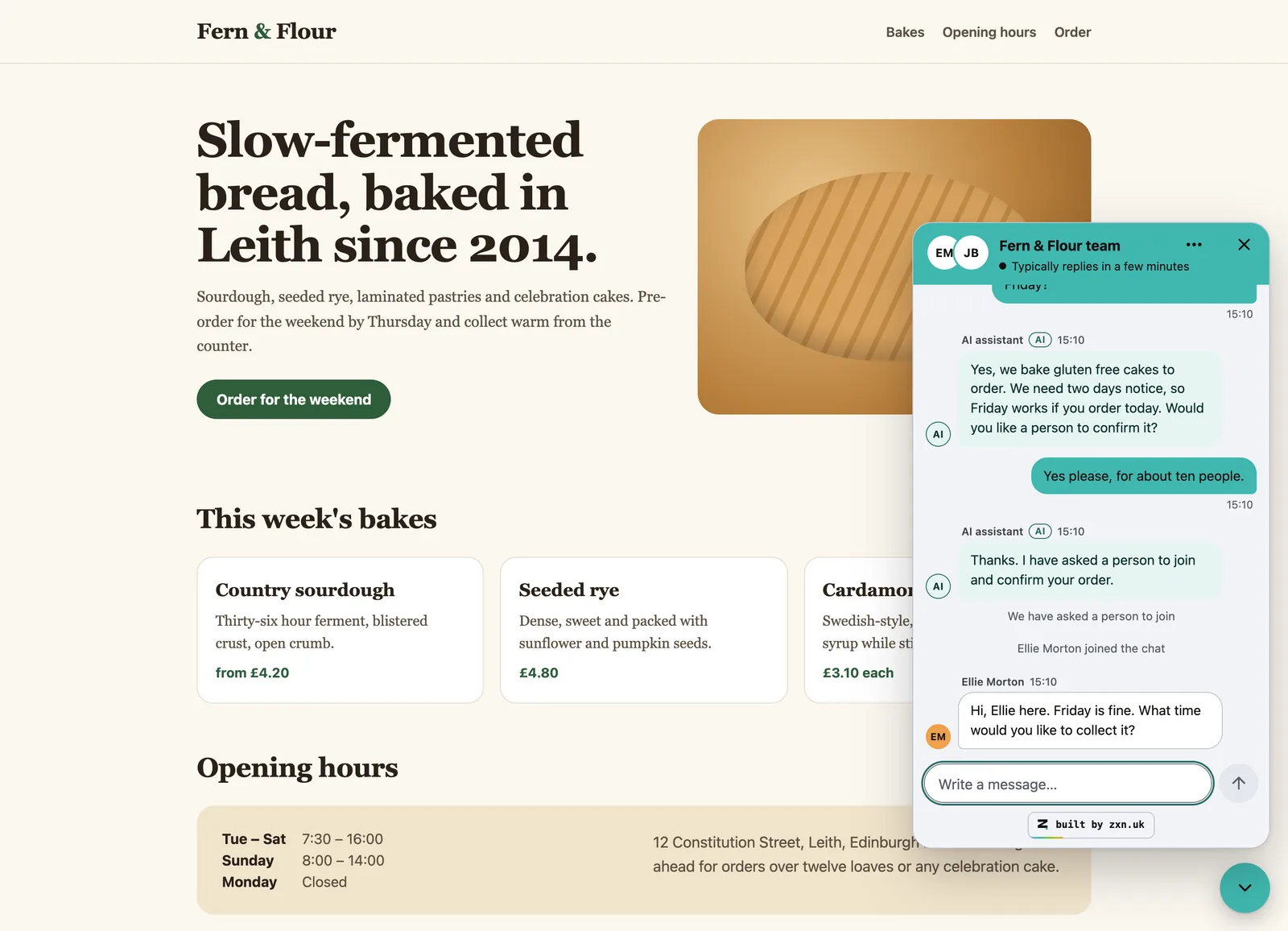
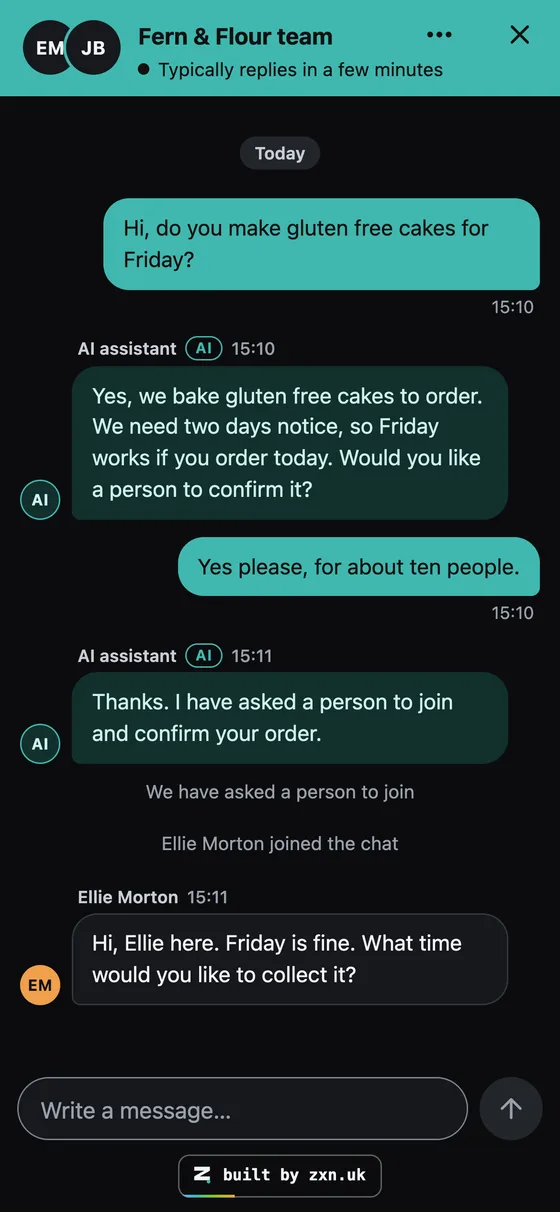
A visitor asks about a cake. The AI answers from the bakery's own information, then a person joins. Real screens from the product. The chats on them are samples, and the visitors are made up.
chat.zxn.uk/app
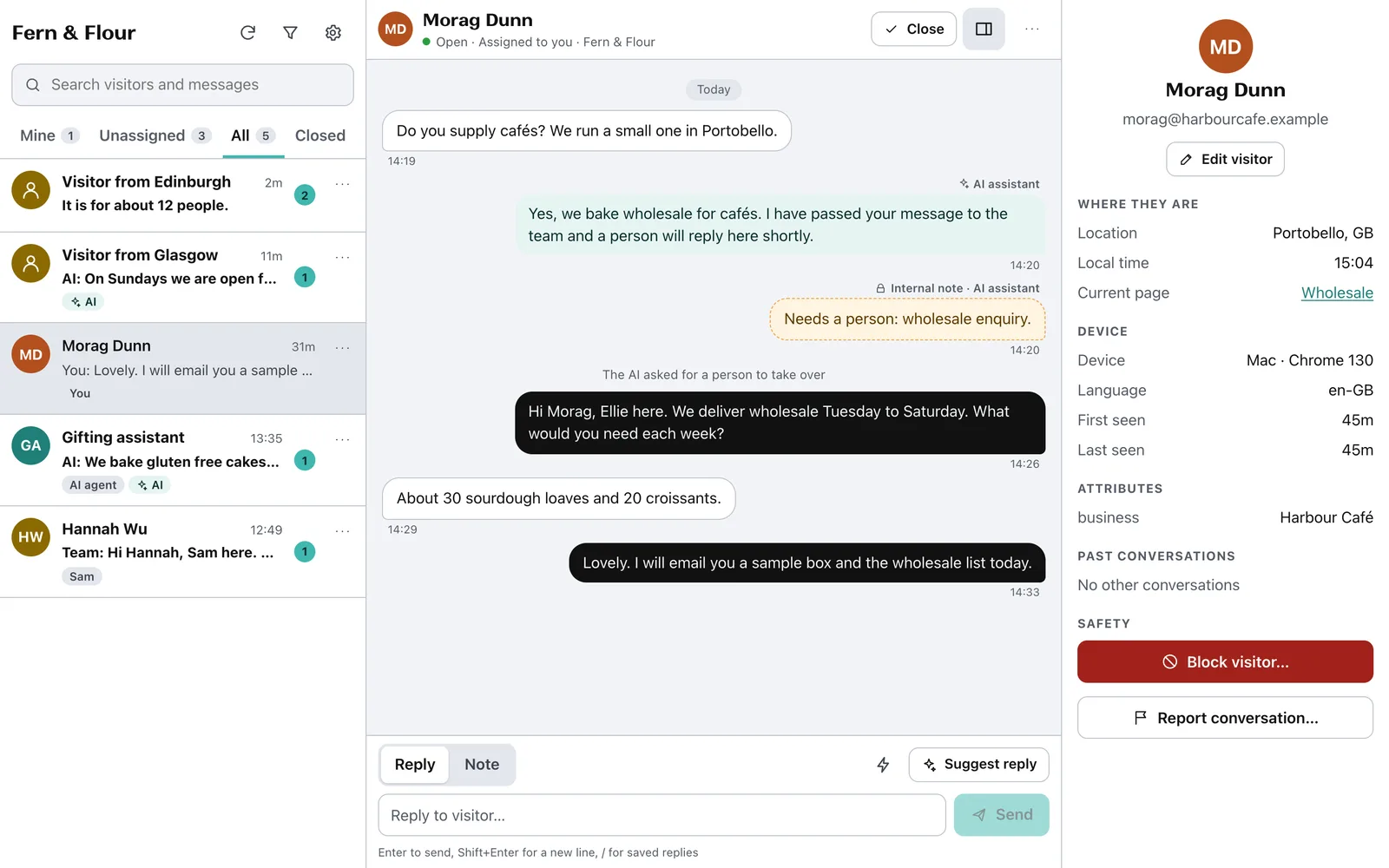
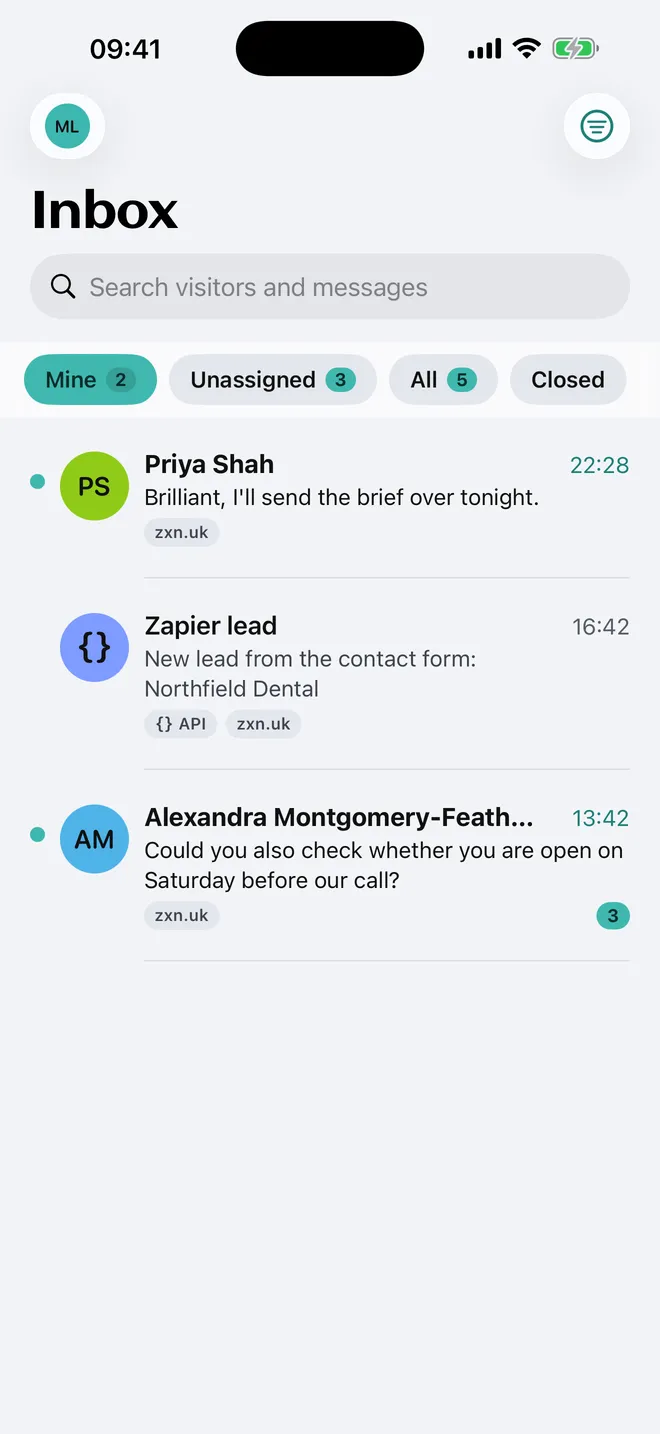
The same chat in the team inbox, on a computer and on an iPhone. Real screens from the product. The chats on them are samples, and the visitors are made up.
At a glance
Who it is for
Small organisations that want visitors to get an answer straight away.
What it is
A chat window, a team inbox on the web, iPhone and Android apps, and a way in for AI tools.
Built on
Cloudflare. Chat history is kept in the EU.
Where it is today
Live on zxn.uk and in the web inbox. The phone apps are in testing.
First version
Built overnight, on 8 November 2026.
Why did we build our own website chat?
We answer visitors on zxn.uk every day, and we build sites for clients who want the same. Three things were missing.
01
A chat that fits our own site
Before this, replies to our visitors went through Slack. That works for us. It does not work for a client who just wants an inbox.
02
AI that tells the truth
The AI answers only from what a business gives it. If it is not sure, it says so and asks for a person.
03
A bill that does not grow with success
Many chat tools charge for each person on the team or each chat the AI answers. We wanted one monthly price with clear limits.
What does zxn Chat look like? Real screens
Each picture is a capture of the running product. Under each one is the same thing said in plain words.
01On the website
The visitor asks a question
The chat window sits in the corner of the page. It carries the site's own colours and name. The AI answers from the information the business gave it, and says it is the AI.
In plain EnglishLike a shop assistant who knows the shop, and who fetches the owner when a question is too big.
A sample bakery website. The chat is invented.
Sample bakery website
02On a phone
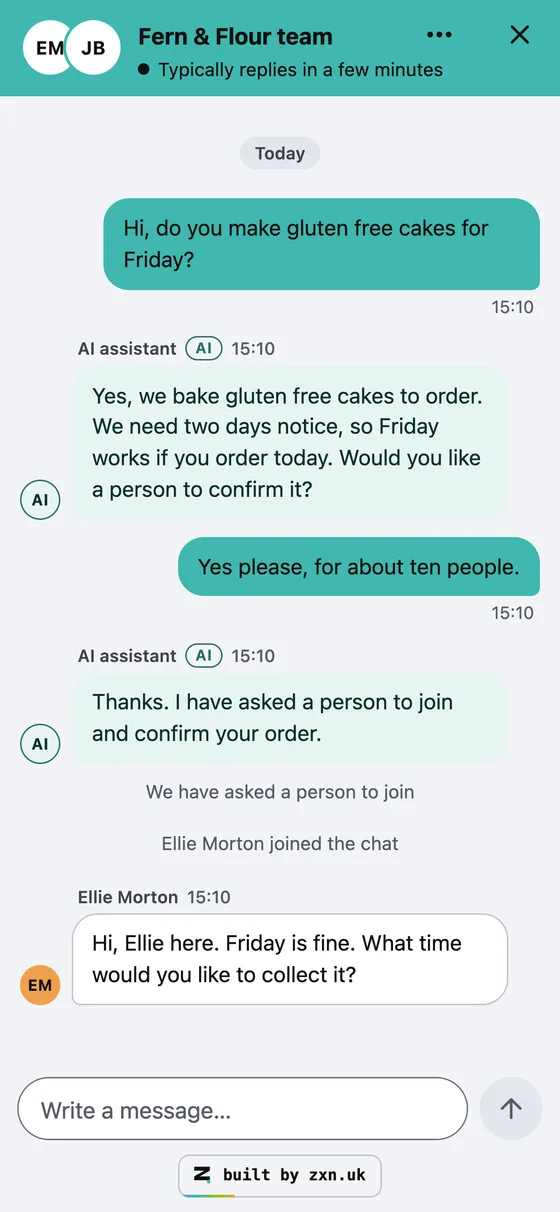
It works on a phone, in light and dark
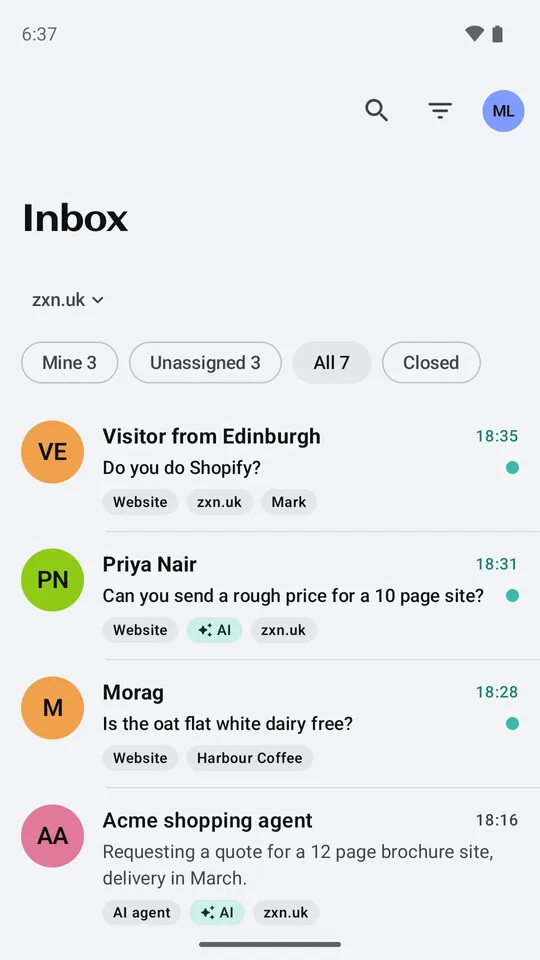
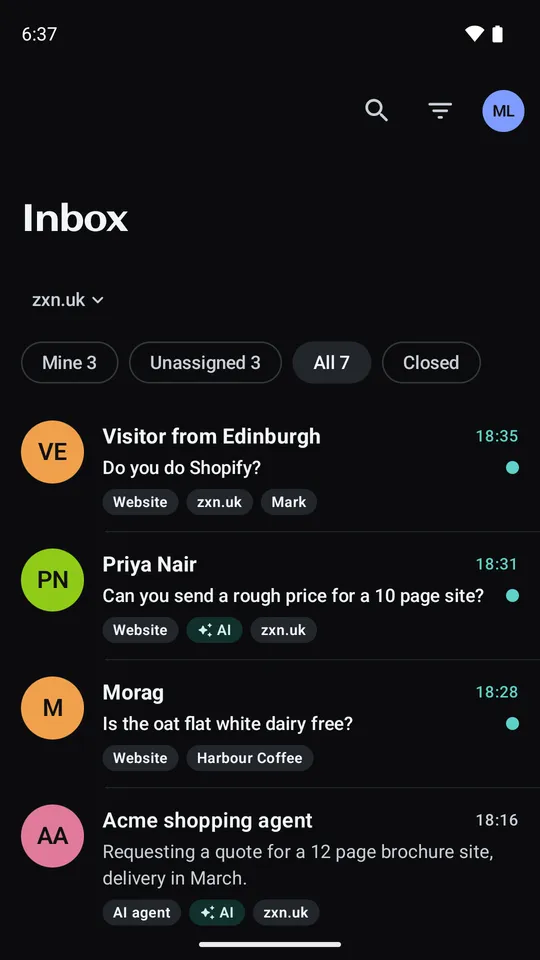
On a phone the chat opens full screen. It follows the visitor's own light or dark setting.
In plain EnglishMost visitors are on a phone, so the phone version is the one we check first.
Sample chat, light and dark.
03In the browser
The team answers from one inbox
Every chat is in one list. Tabs split them into Mine, Unassigned, All and Closed. The AI's replies carry a label. A private note, shown in yellow, is seen only by the team. A visitor panel shows where they are and which page they are on.
In plain EnglishOne shared mailbox for chats, that shows who said what, and when.
Sample chats and made-up visitors.
chat.zxn.uk/app
04iPhone app, in testing
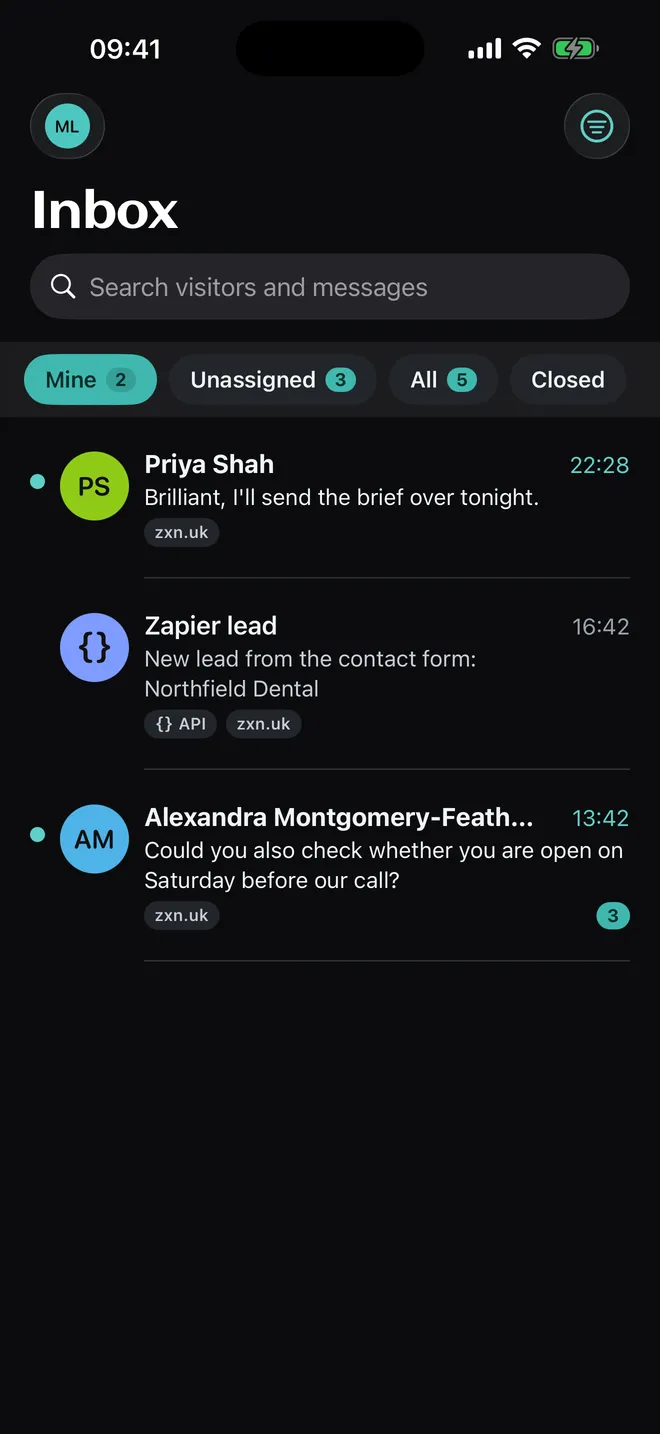
The same inbox on an iPhone
A native iPhone app, written in SwiftUI. Swipe a chat to close it or take it for yourself. Light and dark both work.
In plain EnglishThe inbox in your pocket, so a chat is never waiting for you to get back to your desk.
In testing. It is not in the App Store yet.
05A chat the AI is handling
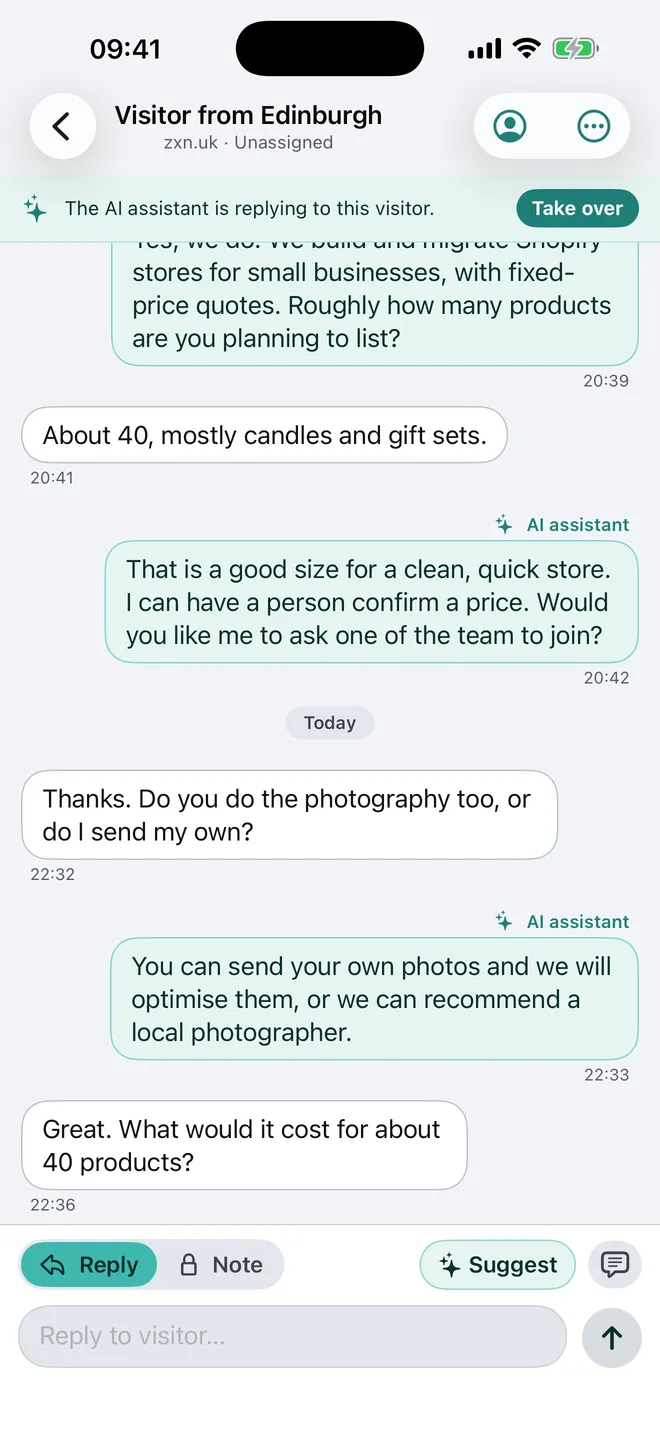
Take over from the AI at any moment
While the AI is replying, a bar says so and offers Take over. A Suggest button writes a draft reply for you to edit. The AI stops by itself after 12 replies in one chat.
In plain EnglishThe AI does the first answers. You are always one tap away from taking the chat.
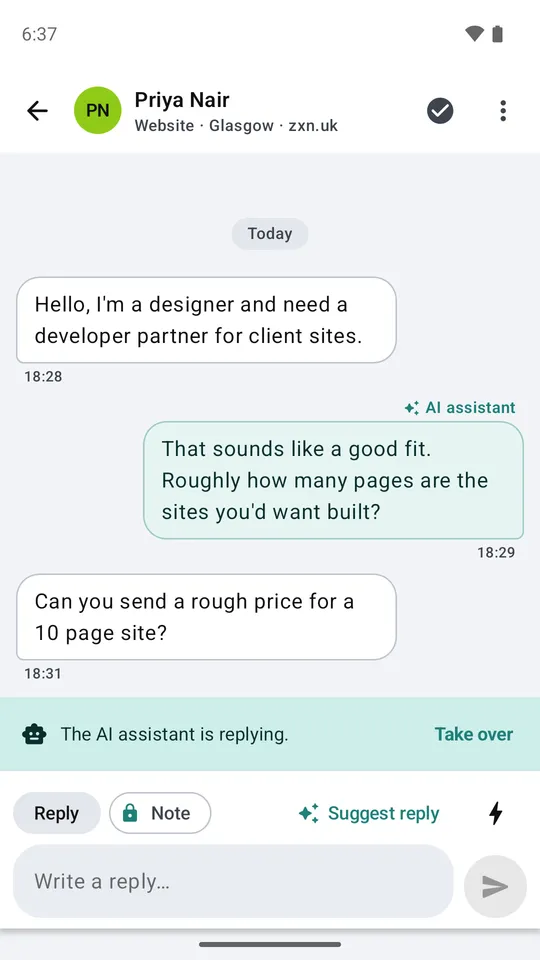
iPhone app, and the Android app beside it. Both are in testing.
06Android app, in testing
Android gets its own native app
Written in Kotlin with Jetpack Compose, not copied from the iPhone. It uses Android's own controls, so it feels like the rest of the phone.
In plain EnglishNot one app squeezed onto two phones. Two apps, each made for its phone.
In testing. It is not in Google Play yet.
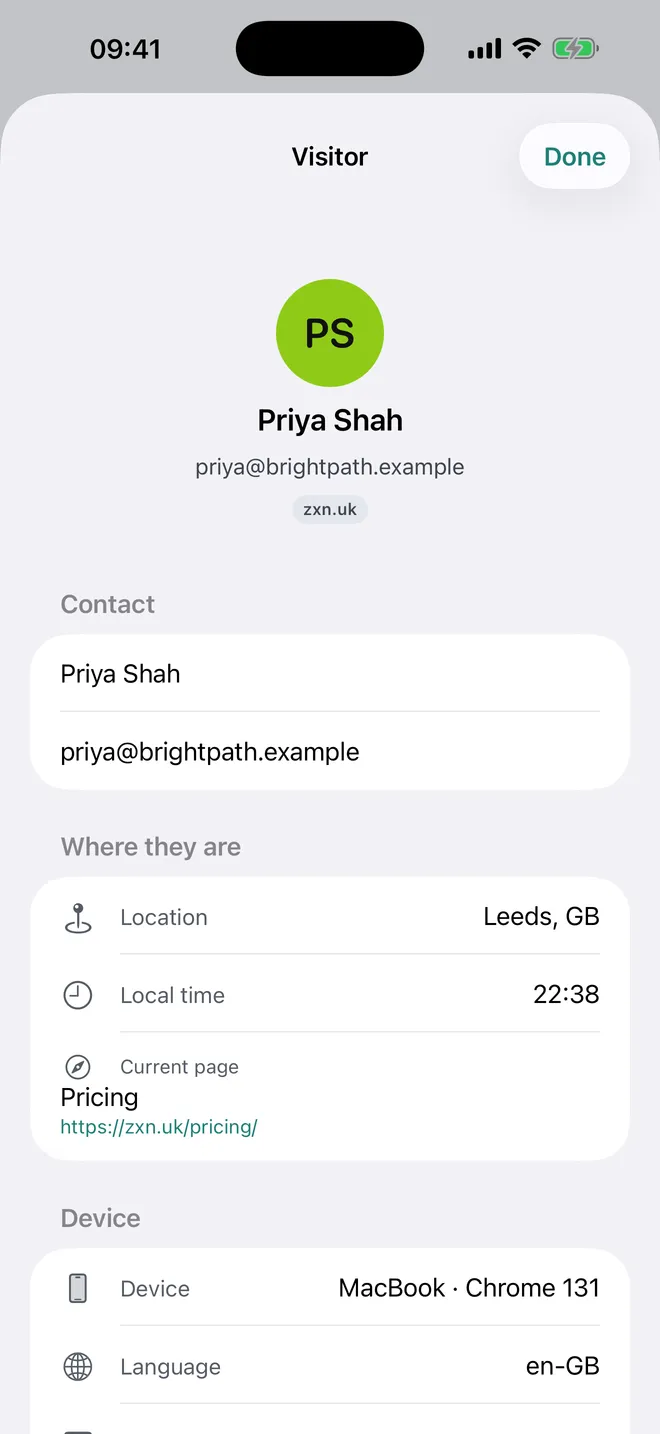
07Visitor details
Know who you are talking to
The team sees the visitor's name, email, town, local time and the page they are on. Past chats with them open from the same screen.
In plain EnglishYou answer a visitor on the pricing page differently from one on the contact page.
Sample visitor. The email address is made up.
How does one message travel?
Here is what happens when a visitor types a question. Five steps, in the time it takes to blink twice.
01 of 05
A visitor sends a message
The chat window on the website sends it to our Worker, a small program on Cloudflare. The window loads nothing until the visitor opens it.
In plain EnglishLike posting a note through a door that only opens when someone knocks.
02 of 05
The message is saved first
The Worker checks which website it came from and writes the message to the database. The database is in the EU. Saving comes before anything else, so nothing is lost if something later fails.
In plain EnglishWrite it down before doing anything else.
03 of 05
A live room tells everyone
Each team has one live room, a Cloudflare Durable Object. It tells every open inbox at once, on the web, an iPhone or an Android phone. A room with nobody in it costs nothing.
In plain EnglishOne room, one announcement, every screen updates.
04 of 05
The AI answers, or asks for a person
The AI, Claude from Anthropic, reads the information the business gave it. It either answers or asks for a person. A limit on replies per chat and per day keeps it in check.
In plain EnglishAnswer if it knows. Fetch a person if it does not.
05 of 05
The team replies and the phone buzzes
A person takes over from any inbox. The visitor sees the reply at once. Phones are sent a push message through Apple or Google.
In plain EnglishThe reply reaches the visitor while they are still on the page.
What is it built with?
One platform, Cloudflare, and a few well-known tools. Each part has one job.
Cloudflare Workers
One small server program, written in TypeScript with Hono. It runs near the visitor and handles chats, the apps and the AI.
Durable Objects
One live room per team keeps every open inbox up to date. A room that nobody is using sleeps and costs nothing.
D1 database, in the EU
Every chat is saved here first. It is the record, so it can use the same copy and restore checks as our other products.
The chat window
Plain TypeScript in a sealed box, so a site's own styles cannot break it. The first file is about 4 KB, with a hard limit of 6 KB. The window itself is about 15 KB, with a limit of 40 KB. The build fails if either grows past its limit.
The web inbox
React and Vite, served by the same Worker at /app. It works on a computer or a phone, with push messages in the browser.
iPhone and Android apps
Swift with SwiftUI for iPhone, Kotlin with Jetpack Compose for Android. Two native apps, in testing.
Claude from Anthropic
Writes the AI replies from the information a business gives it. A visitor's message goes to it, which the privacy notice says.
MCP, A2A, API and webhooks
Other software and AI assistants can read and answer chats, or talk to a business's chat as a visitor would.
How did we make the big choices?
Six decisions shaped it. Each one had a real alternative. This is the record of what we weighed.
01 Decision
Native phone apps, or one app for both?
We wanted apps that feel at home on each phone.
ChosenTwo native apps: SwiftUI and Jetpack Compose
Each phone keeps its own feel: swipe actions, the back gesture, and a reply typed straight into a notification. The cost is two code bases to keep.
RejectedOne app in Flutter
Less code to keep. But the native controls would need a bridge between the app and the phone.
02 Decision
Where should the chats live?
Live rooms are fast, but we also need a safe record we can copy and restore.
ChosenThe D1 database is the record. Live rooms only pass messages on
Our copy and restore checks already work on D1, and questions about the data are simple to ask.
RejectedKeep the chats inside each team's live room
Possible, but we would have had to build the copy and restore checks again.
03 Decision
How is a returning visitor recognised?
The chat window runs on the customer's website, not on ours.
ChosenA random code kept in the window's own storage on that site
Only a scrambled copy of the code is saved on our side. It works in every browser.
RejectedA cookie from our own domain
On a customer's site that is a third-party cookie, and Safari and Firefox block those.
04 Decision
How should AI tools connect?
Other software, and AI assistants such as Claude, should be able to work the inbox.
ChosenScoped API keys for the MCP server, and an A2A address for each site
Keys work in every MCP tool today. A2A lets one AI agent talk to a business's chat the way a visitor would.
RejectedSign-in with OAuth for MCP from the start
A good idea for later. For the first version it would have left some tools unable to connect.
05 Decision
How do we keep the web inbox safe?
It holds other people's conversations.
ChosenA protected session cookie, a check of where each request comes from and a strict content policy
Nothing secret sits in the browser's storage. The build fails if any page contains inline script.
RejectedA token kept in the browser
Simpler, but a script that slipped in could read it.
06 Decision
How do we stop the AI running away?
An AI that answers everything can cost a lot and say wrong things.
ChosenAnswers only from the business's information, 12 replies per chat, a daily limit per site
It stays on topic, hands over to a person, and cannot run up a bill.
RejectedNo limits
Fewer rules to explain, but one bad day could cost real money.
What has it done so far?
Only things we can show. No made-up numbers.
Running on zxn.uk
Since 10 November 2026 the chat on our own website is this product. Try it: it is the button at the bottom right of this page.
The web inbox works today
At chat.zxn.uk/app, on a computer or a phone. Automatic browser tests run in Chromium, Firefox and WebKit.
Checked in production after each release
A test message goes from the chat window to the inbox, and a call from an AI tool is answered. If either fails, the release is flagged.
Installs with one line
Paste one line of code into a page, or install the WordPress plugin. We installed the plugin on a test WordPress site and saw the chat window appear.
What is not done yet
zxn Chat is live, and it is young. These are the honest edges.
The phone apps are in testing
The iPhone app is in TestFlight and has not yet passed App Store review. The Android app is in Google Play's internal testing. Neither is in a store yet.
Push messages on real phones
The code is wired to Apple and Google. We are still testing it on real phones before we call it done.
Customers are set up by us
There is no sign-up page yet. We add the chat to a site, load the business's information and look after it.
zxn Chat: common questions
What is webchat?
Webchat is a chat window on a website. A visitor types a question and gets an answer straight away, from an AI or from a person.
Is zxn Chat a chatbot or live chat?
Both. The AI answers first, from the information you give it. A person can take over at any moment, and the AI asks for one when it is not sure.
Does the AI make things up?
It is built not to. It answers only from your information and asks for a person when it is unsure. It stops after 12 replies in one chat.
Where is the chat history kept?
In the EU. The AI that writes replies is Claude, made by Anthropic, so a visitor's message goes to it. The privacy notice says what is kept and for how long.
Does it work on any website?
Yes. Paste one line of code into the page, or install the WordPress plugin.
Can other software or AI assistants use it?
Yes. There is a documented API, webhooks, an MCP server and an A2A address for each site.
Is there an iPhone or Android app?
Both exist and are in testing. They are not in the stores yet. The web inbox works today, on a computer or a phone.
Facts checked on 15 November 2026 against the product's own decision records and its production check. The chats on every screen are samples, and the visitors are made up.
Help us improve this site. We count visits, and Accept also lets us record how pages are used and see which Google ads led to an enquiry. Details