Nursery Kitchen: a menu and allergen checker for a nursery
Nursery Kitchen is a menu and allergen checker we built for a community nursery in Perth, and it is in daily use there. A cook pastes a supermarket link and the app reads the ingredients. It then checks every meal against what each child must avoid.
Each meal shows what is in it. A red warning says a child needs a different meal. Real screens from the app. The children, dishes and products on them are made up, so none of the nursery's own records are shown.
Nursery Kitchen · sample data
Each child's meal for the day, checked against what they must avoid. Real screens from the app. The children, dishes and products on them are made up, so none of the nursery's own records are shown.
At a glance
Who it is for
A nursery kitchen that cooks for children with allergies and has to check every meal.
What it is
A web app: four steps for the cook, a weekly menu, a list of children and a check before food is served.
Built on
Cloudflare, with the database in the EU. Allergens are found by fixed rules, not by AI.
Where it is today
In daily use at the nursery, behind a staff password. It has been live since 16 October 2026.
How it started
A prototype made in an AI site builder, rebuilt and moved to our hosting on 16 October 2026.
What was the nursery's problem with menus and allergens?
A nursery cook plans meals for a mix of children. Some have an allergy, and some families ask for a food to be avoided. The check has to be right every day.
01
The same job, typed again and again
To add one product, the cook opened the supermarket page and found the ingredients. They read the allergens printed in bold and typed them beside each meal on a four-week menu that arrived as a PDF.
02
A change in one place has to reach every meal
Swap a brand of sauce and every meal that uses it changes. So does the list of children who must avoid something in it. Nobody wants to find that out at the serving table.
03
"May contain" is not the same as "contains"
A label can say an ingredient is in the food, say it might be, or say nothing. The nursery needs those kept apart, and a missing answer never read as a safe one.
What does Nursery Kitchen look like? Real screens
Each picture is a capture of the running app. Under each one is the same thing said in plain words.
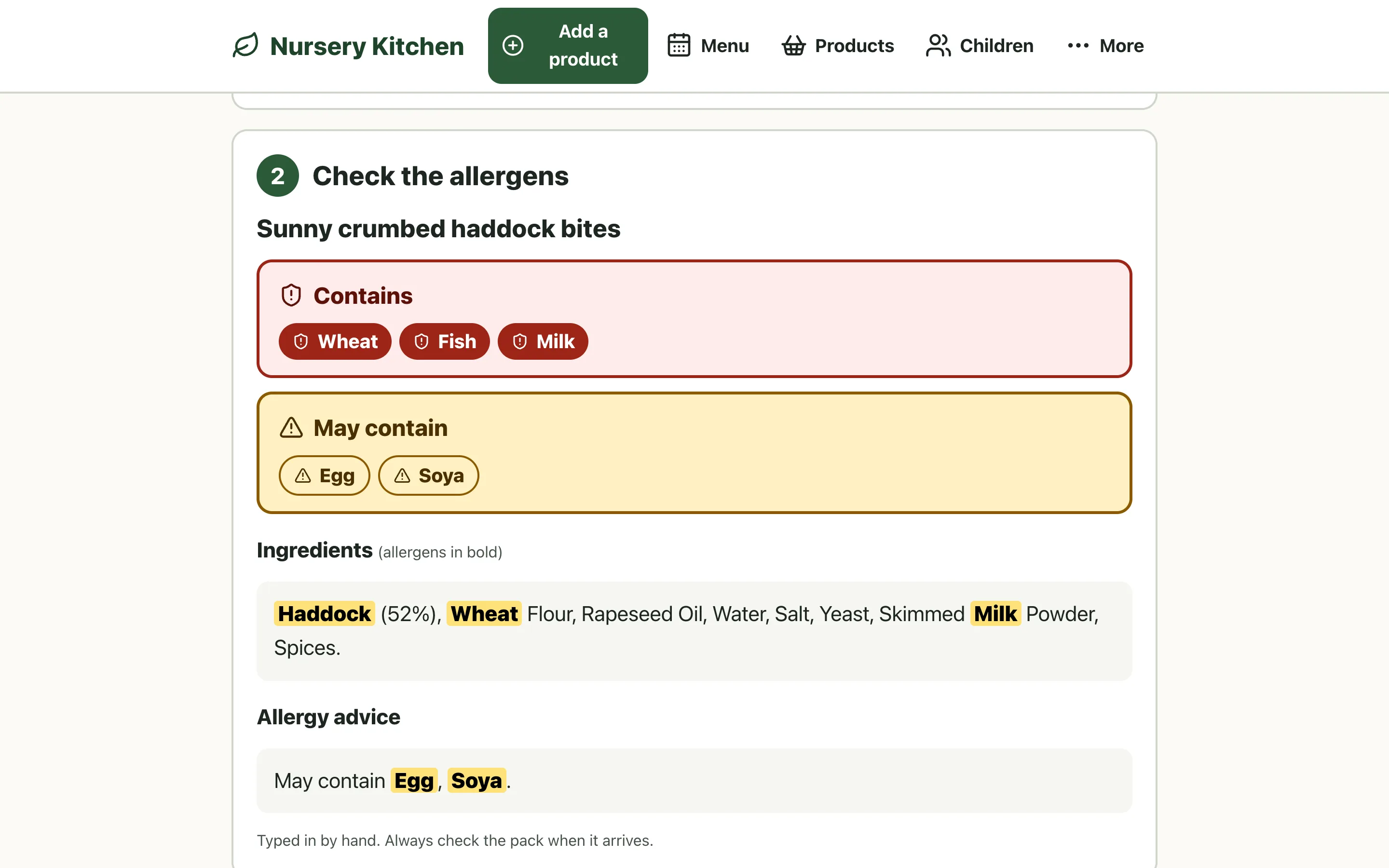
01Add a product
Paste a link, see the allergens
The cook pastes a supermarket product link. The app reads the ingredients and allergy advice from the product page and finds the 14 regulated allergens. Contains is red and May contain is amber, each with a word and an icon. The ingredients are shown in full, with the allergen words in bold. With no link, the product can be typed in and goes through the same steps.
In plain EnglishLike reading the label out loud and circling the allergens, without the typing.
Sample data. This product is made up and was typed in; a pasted link fills the same boxes.
Nursery Kitchen · sample data
02The week's menu
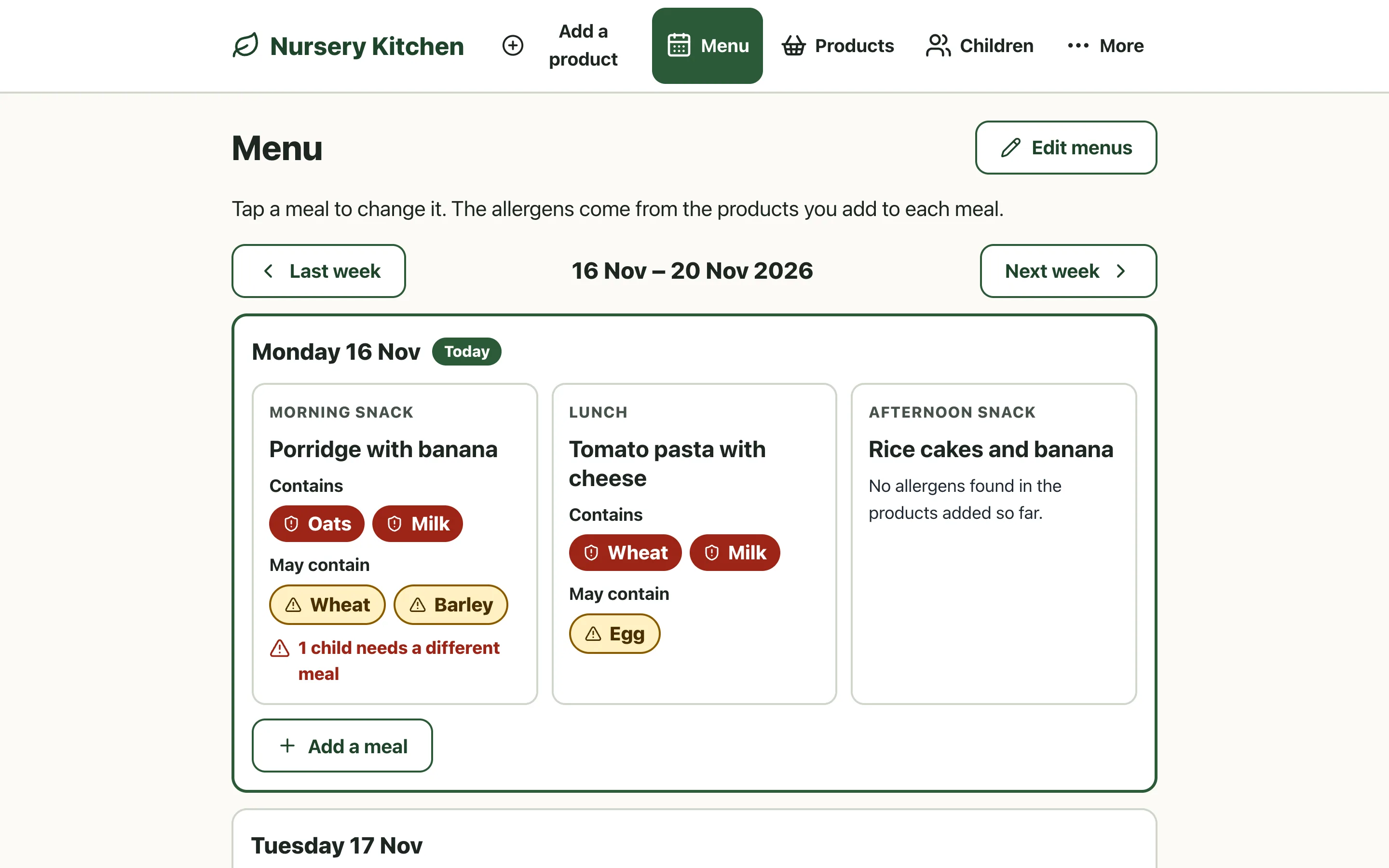
The menu shows what is in each meal
Each day lists its meals. A meal shows what the products added to it contain and what they may contain. If a child who is in that day must avoid something in the meal, the card says how many children need a different meal.
In plain EnglishThe whole week's cross-check, at a glance.
Sample menu. The dishes are invented.
Nursery Kitchen · sample data
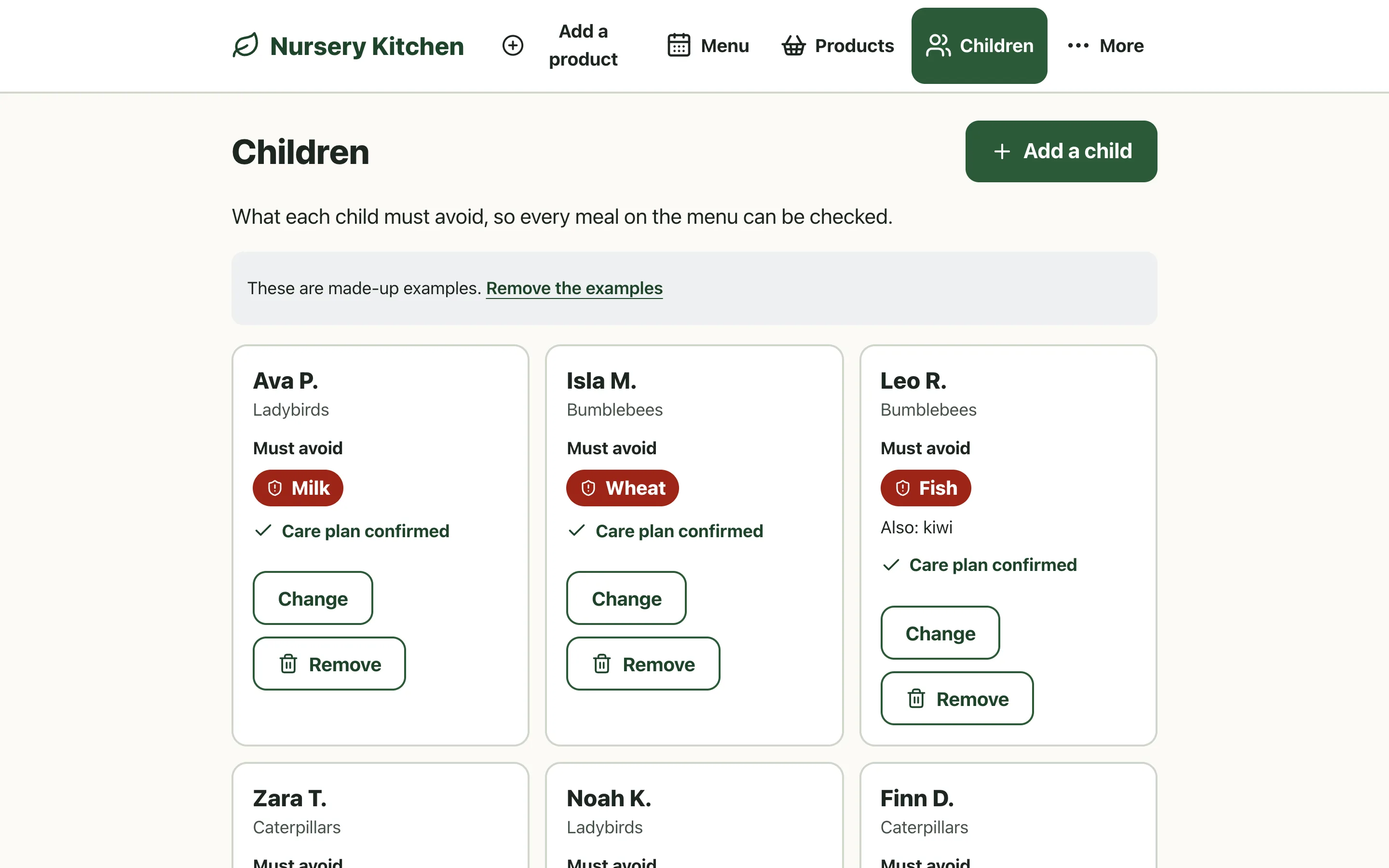
03Children
Each child's list of foods to avoid
A child is shown by a short name, a room and what they must avoid. A food that is not one of the 14 allergens can be added in words. The app also shows when the care plan was last confirmed.
In plain EnglishThe signed care plan stays where the nursery keeps it. The app holds only what it needs to check meals.
Sample children. The names are made up.
Nursery Kitchen · sample data
04Serving checks
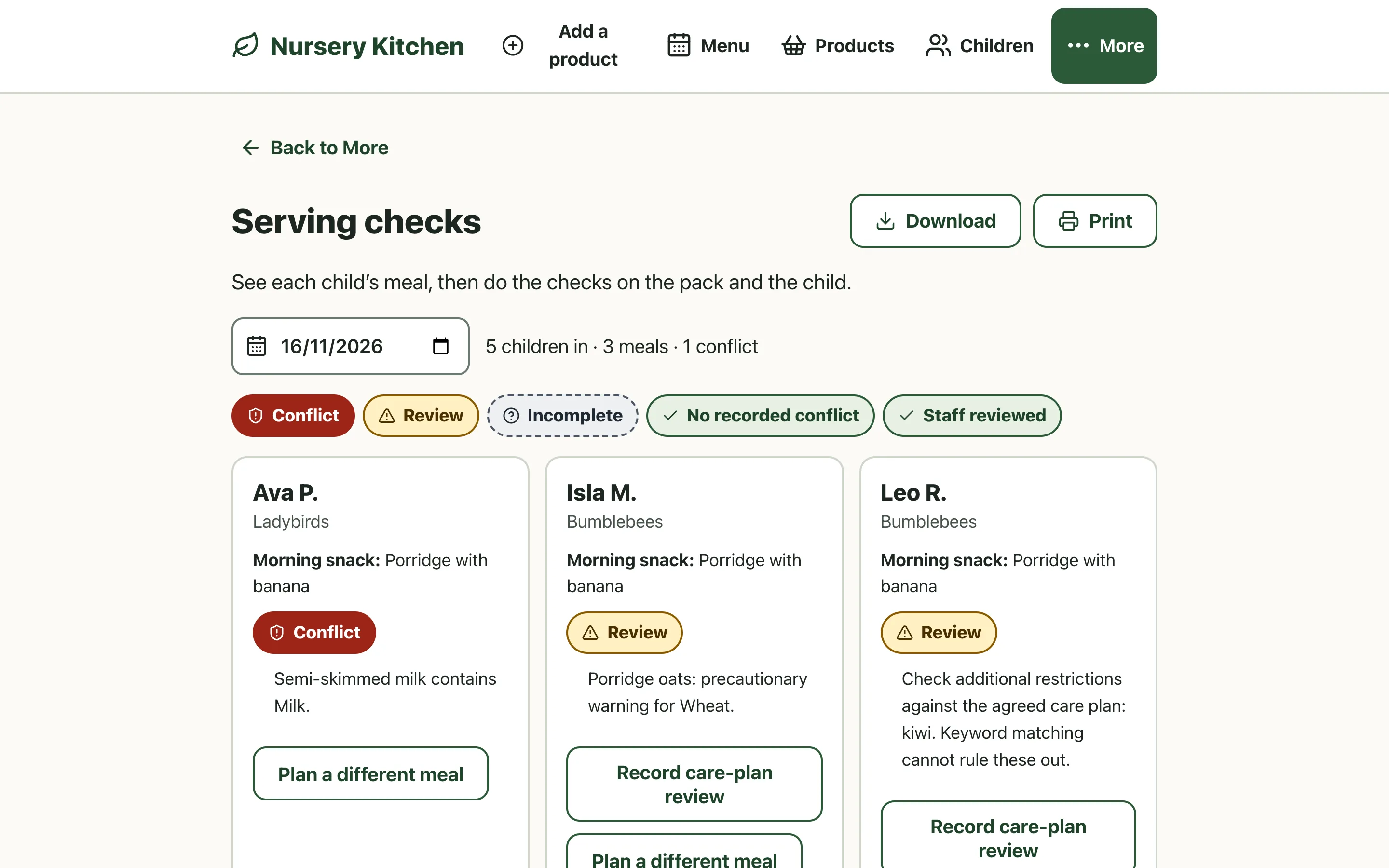
Check each child's meal before it is served
Every child who is in on the day is listed against the meal they will be given, with one of five results. These are Conflict, Review, Incomplete, No recorded conflict and Staff reviewed. A meal with a conflict has a button to plan a different meal. Before the checks are recorded, four things are checked on the real packs and the real child.
In plain EnglishThe app does the matching. A person still looks at the pack and at the child.
Sample children and meals. "No recorded conflict" never means safe, and the page says so.
Nursery Kitchen · sample data
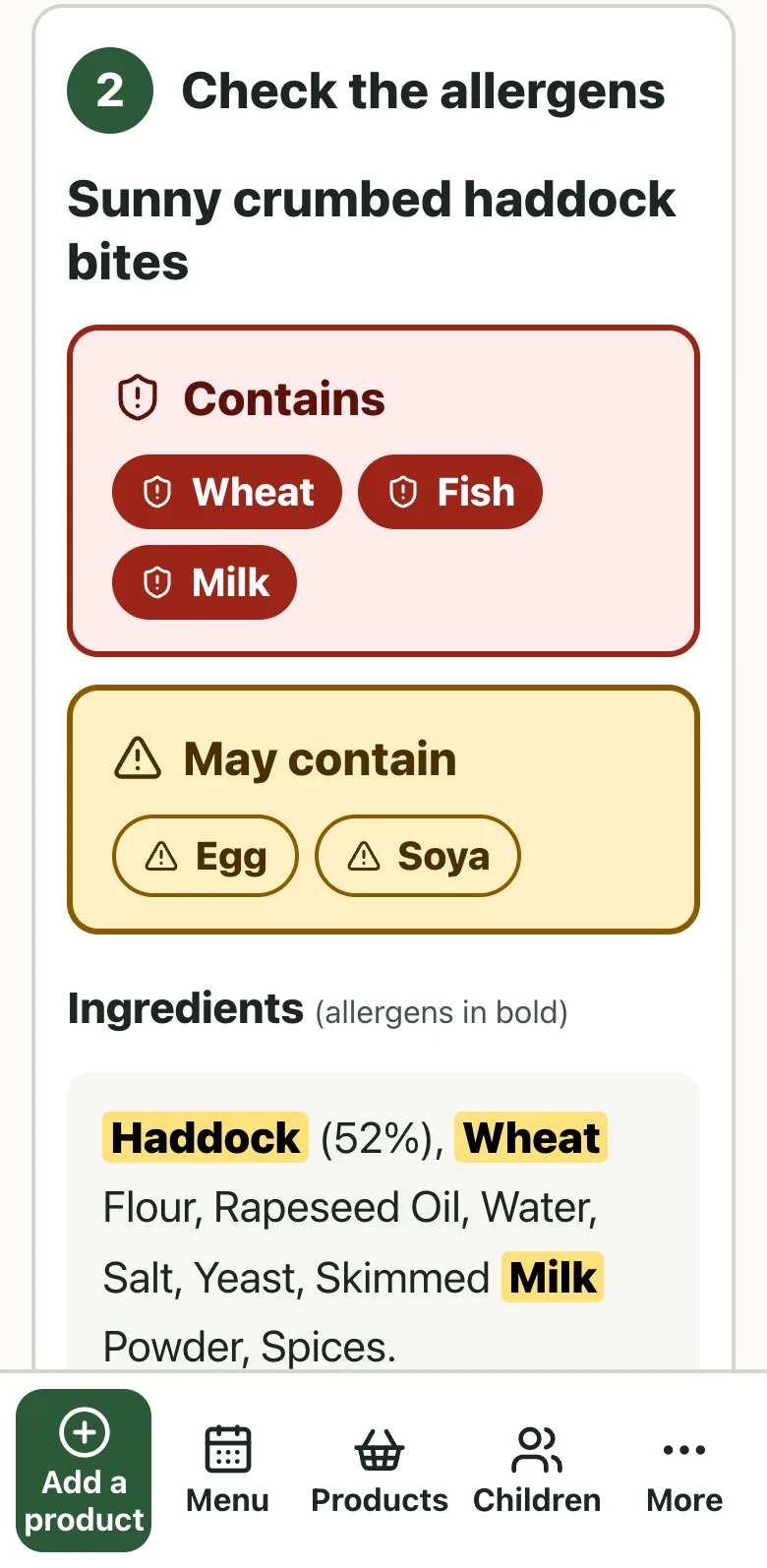
05On a phone
It works on a phone or tablet
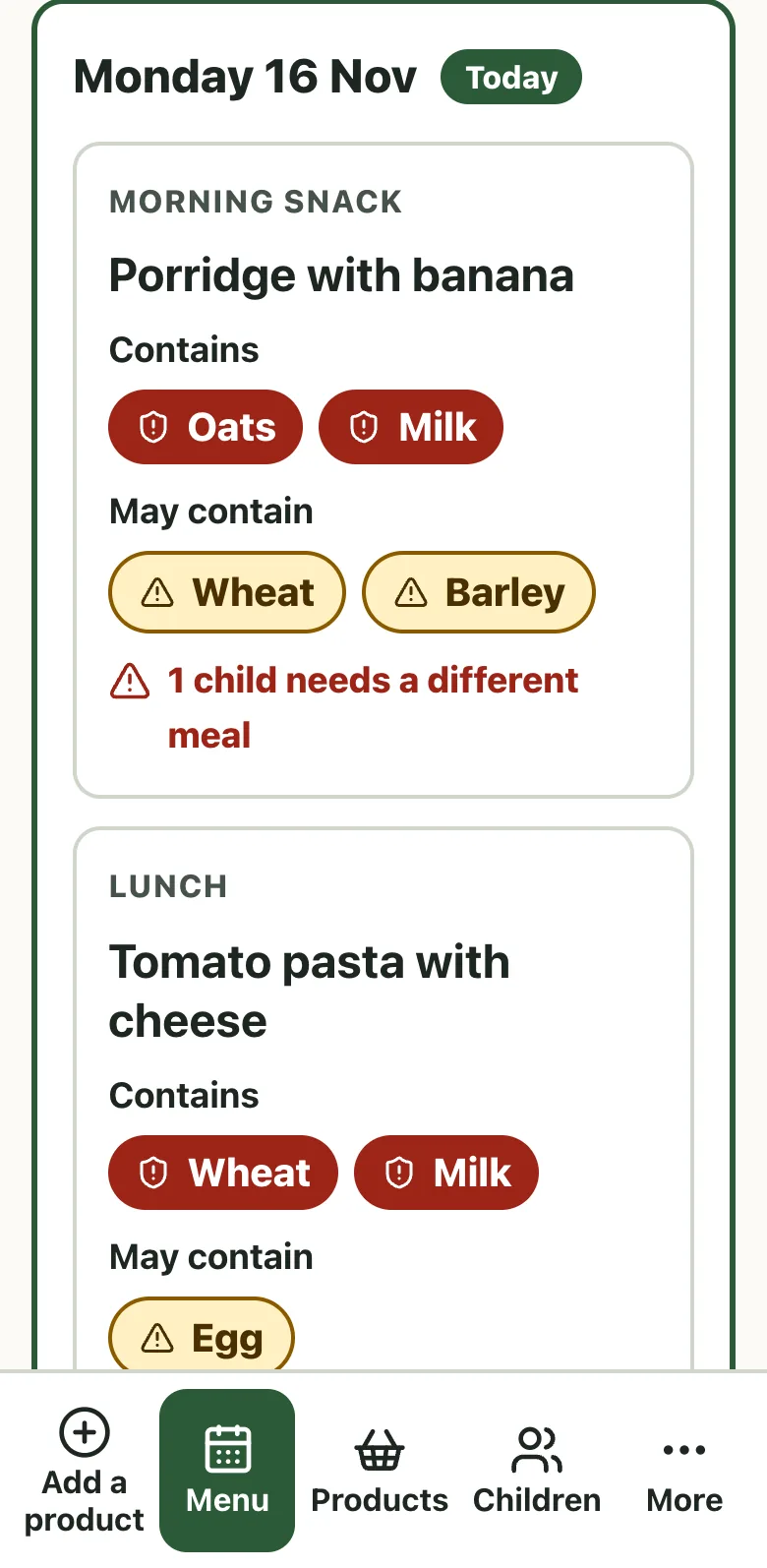
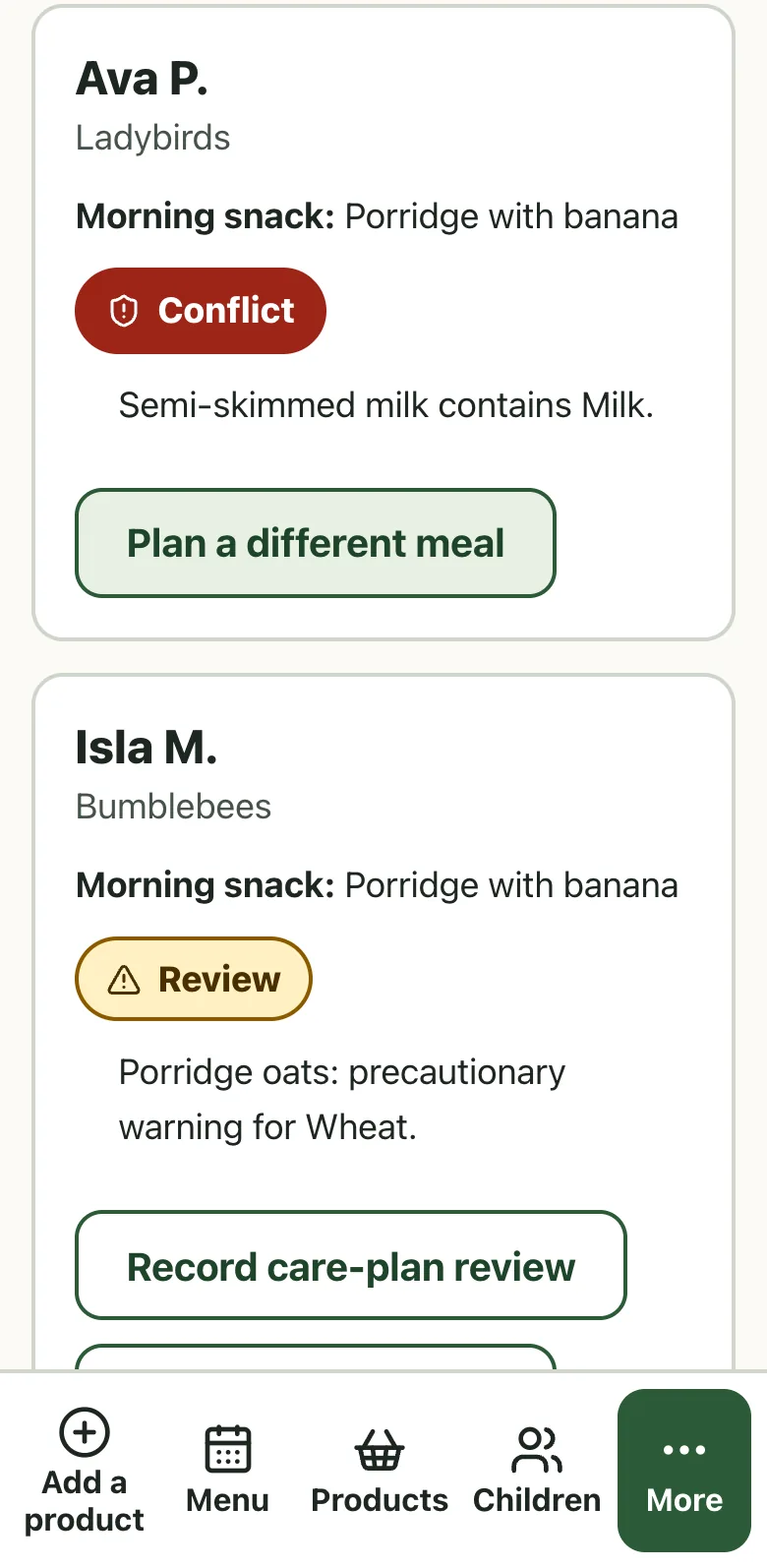
Text is 18 pixels or larger and buttons are at least 56 pixels tall. Nothing relies on colour alone: every tag has a word and an icon. On a phone the menu moves to a bar at the bottom.
In plain EnglishThe cook who uses it has had no software training, so it has to be obvious.
Sample data, on a phone.
How does a product reach a child's check?
Here is what happens when a cook adds one product. Five steps.
01 of 05
The cook pastes a product link
Only the web address of the public product page is sent anywhere. No child, no account and no basket.
In plain EnglishA link goes out. Nothing about a child does.
02 of 05
The page is read
A reader service returns the text of the product page, from a copy up to an hour old. The app keeps the ingredients and the allergy advice. If the page cannot be read, nothing is saved and the cook is told.
In plain EnglishA failed read changes nothing.
03 of 05
Fixed rules find the allergens
Plain, tested rules look for the 14 regulated allergens, with wheat, rye, barley and oats under cereals and each tree nut by name. A missing warning is shown as not known, never as free from.
In plain EnglishThe same label gives the same answer every time.
04 of 05
The product goes onto meals
The cook picks the meals it is used in. The menu updates at once: each meal's allergens change, and so does the number of children who need a different meal.
In plain EnglishChange it once and every meal follows.
05 of 05
The check meets each child
For each child who is in that day, the app compares their meal, or the different meal planned for them, with what they must avoid. A person records the check after looking at the real packs.
In plain EnglishThe software matches. A person decides.
What is it built with?
One platform, Cloudflare, and a few well-known tools. Each part has one job.
React and Vinext
The screens are React. Vinext lets an app written in the Next.js style run on Cloudflare.
Cloudflare Workers
One small server program runs the app and its few endpoints, behind the staff sign-in.
D1 database, in the EU
The workspace is saved with a revision number, so two open tabs cannot overwrite each other. A separate trail records what changed, when and by whom, without health details.
Fixed allergen rules
Plain TypeScript with no AI. 45 automated checks on the rules, expiry dates, reviews and exports pass as of 15 November 2026.
A product page reader
Jina Reader turns a public product page into text. Only the page address is sent to it.
Staff sign-in
A shared password and a signed session that lasts 12 hours. Everything, including the menu PDF, sits behind it.
An Edge browser helper
An optional add-on: one click on a product page sends its link to the app. It reads only the page address.
Backups and exports
A backup file and a spreadsheet of the menu checks. The spreadsheet cells are protected from formulas.
How did we make the big choices?
Six decisions shaped it. Each one had a real alternative. This is the record of what we weighed.
01 Decision
Should an AI read the labels?
A wrong answer here could harm a child.
ChosenFixed, tested rules
The same label gives the same answer every time, and each rule has a test. The result is advice for staff, never a safety certificate.
RejectedAn AI model reads each label
It could cope with odd wording. It could also miss an allergen or invent one, and we could not test every answer it might give.
02 Decision
How should "may contain" and "not known" be shown?
A label can say yes, maybe, or nothing at all.
ChosenSeparate states, and unknown never reads as safe
Contains is a conflict. May contain needs a person to review it and stops the check being recorded. Missing information stays marked as not known.
RejectedOne list of allergens
Simpler to look at, but it hides the difference between what is in the food and what might be.
03 Decision
Who decides if a child can have a "may contain" meal?
That is a question for the child's care plan, not for software.
ChosenStaff, with a written reason, for that child and that meal
A person confirms the care plan and the pack, and writes why. The decision is tied to that child, meal, recipe and product, and any change cancels it. It can never override a definite conflict.
RejectedThe software decides from the label
A keyword match cannot know what a care plan allows.
04 Decision
Where does the product information come from?
We found no public data feed from the supermarket the nursery uses.
ChosenRead the public product page, and let staff type a product in
One pasted link replaces the copying. When a page cannot be read, nothing is saved and typing always works. The supermarket's terms and the reader's reliability still need checking.
RejectedAn unofficial route to the supermarket's data
Not something to build a nursery's routine on.
05 Decision
How simple should the screens be?
The cook has had no software training.
ChosenFour steps, large text and plain words
Paste, check, choose, done. Words like "workspace" and "evidence" were taken out, and the rest sits under a button called More.
RejectedEverything on view at once
Our first version had eight equal places to start. Nothing said where to begin.
06 Decision
Build a tool, or buy one?
Nursery and catering tools already exist, and a free recipe tool is published by Food Standards Scotland.
ChosenA small tool for this nursery's own routine
We compared existing tools first. What we could add was open evidence for each product, a different meal for an individual child and honest not known states.
Not chosenA ready-made nursery system
It may suit the nursery better in the end. From public pages we could not confirm that one covers each child's different meals and shows where each label came from. We did not check prices.
What does it not do?
Nursery Kitchen is advice for staff. These are the things it cannot do.
It is not a safety certificate
It finds allergens by keywords. A missing warning is shown as not known. Unusual wording can be missed, and a "free from" phrase can confuse it.
It cannot see the kitchen
It does not check how food is kept apart, who is trained or what was actually served. It has no recall feed and does not track stock batches.
It does not replace the label or the care plan
Every delivery, every swap and every child still needs a person to read the pack and the plan.
What has it done so far?
Only things we can show. We have not measured time saved, and we will not quote a number until we can show where it comes from.
In daily use, behind a staff sign-in
Live since 16 October 2026 on our Cloudflare account, with the database in the EU, and in daily use at the nursery. It is private: nothing shows without the staff password.
The four-week menu went in without retyping
The nursery's menu arrived as a PDF: 60 entries over four weeks from 26 October 2026. The app loaded all 60 as draft meals. No ingredients were guessed from the dish names.
The rules are tested
45 automated checks cover the allergen rules, how long a check stays valid, care plan reviews and exports. They pass as of 15 November 2026.
The cook's screens were simplified
A review of the first version found eight equal places to start, small text and unfamiliar words. The four-step version replaced it on 16 October 2026.
What is still to do
These are the open items we know of, from our last read of the app's notes on 15 November 2026.
Children's records need a clear basis
Allergy information about a child is health information. Holding it needs a clear legal basis and a data protection impact assessment. It also needs an agreed retention period and a written agreement with whoever processes the data. Those are for the nursery to settle, and this page does not say they are done.
One shared login, no staff roles
Everyone uses one workspace and one password. Separate accounts, roles and removing someone's access still have to be designed.
Product pages come from a service we do not control
The reader can be busy or blocked, and the supermarket's terms on automated access still need checking. Typing a product in always works.
The Edge helper is not installed
It is built and tested. When we last read the notes, it was not on the nursery's own computer or in the Edge store.
Past checks are not a full record
They show who recorded a check and when, but not a full copy of every label at that time. They should not be the nursery's only record.
Nursery Kitchen: common questions
What is Nursery Kitchen?
It is a web app that checks a nursery's menu against the foods each child must avoid. Staff add products from supermarket pages, put them on meals and see which children need a different meal.
Is it in use at the nursery?
Yes. It is in daily use in the nursery's kitchen, behind a staff sign-in, and has been live since 16 October 2026. The screens on this page use made-up children and dishes, not the nursery's records.
Does it use AI to find allergens?
No. Fixed rules find the 14 regulated allergens in the ingredients and allergy advice, and a person checks the result against the pack.
Can a nursery rely on it?
Not on its own. It is advice for staff, a missing warning is shown as not known, and every delivery, pack and child still needs a person's check. It is in daily use at one nursery, and that does not change this.
Where is the data kept?
In a database on Cloudflare in the EU, behind a staff sign-in. Pasting a link sends only the web address of a public product page to a reader service.
Could another nursery use it?
Not as it stands. It is built around one nursery's routine. We can talk about a version for yours, and about what would need to be agreed first.
Could a school or care home use the same idea?
The idea is the same: match a menu to a list of foods each person must avoid. The data, access and checks would need agreeing for each setting.
Facts checked on 15 November 2026 against the app's own design notes, rollout notes and tests. Daily use is as our team reports it, not something we have measured. The children, dishes and products on every screen are made up. We have left the nursery's name out of this page.
Help us improve this site. We count visits, and Accept also lets us record how pages are used and see which Google ads led to an enquiry. Details